

Ask what a SAP Basis outsourcing contract covers and the answer usually comes down to three words: monitoring, patching, on-call. None of them tells you who picks up a security alert at 2 a.m., who decides on the second Tuesday of the month which SAP Security Patch Day notes go to production that week, or which tool will monitor your landscape once standard maintenance for SAP Solution Manager runs out.
We have run SAP Basis operations for years, and in one of the landscapes we look after, Basis support and round-the-clock security monitoring have sat with the same team since February 2023. What follows covers the scope of the service, the checks we run every day, how to read an SLA, and where operations and security overlap.
In short:
1/ Basis outsourcing covers the technical layer - system, database, kernel, transports, backups and performance; functional support and development are separate services, and the contract should say so,
2/ the quality of the service shows in the daily system check; ours runs through seventeen transactions, from instance status to stuck transport imports and IDoc backlogs,
3/ an SLA is only useful when it separates response time from restoration time and states who keeps the clock,
4/ security patching, hardening and event monitoring are Basis work, so it is simplest when one provider owns them, with a periodic penetration test checking the result from outside.
What SAP Basis outsourcing covers
The scope runs from daily system checks and alert handling through to SAP HANA administration: backups, disaster recovery, high availability and capacity planning. In between sit patching and upgrades (SAP Security Notes, kernel, support packages), performance analysis and tuning, change management with transport control, and 24/7 incident handling.
The boundary that causes most arguments after signature lies between the technical layer and the application. Basis support is responsible for keeping the system running, current and fast. It is not responsible for a misconfigured finance module or a report written by another vendor. If the contract does not separate the two, every incident starts with a debate about ownership while the SLA clock is already running.
When outsourcing beats an in-house team
Genuine 24/7 cover needs several people with comparable skills who can stand in for each other. For many organisations that is more Basis headcount than the landscape justifies, and engineers with real SAP HANA and SAP S/4HANA experience are scarce. Hiring one more person does not solve it; it just moves the gap to holidays and sick leave.
An in-house team, on the other hand, knows the business and the people on the other side of the tickets, and no provider can buy that. A hybrid model therefore often works best: the client’s team keeps architecture and decisions, the provider takes on-call duty, routine checks and patching. It only works if the contract is precise about who approves a change to production.
What we check in an SAP system every day
The daily check is the simplest test of whether a support provider knows what it is doing. Ours covers seventeen transactions in a fixed order. Where it makes sense, a UiPath bot runs the check and compiles the results into one report, so the on-call engineer starts the day by reading it rather than clicking through screens.
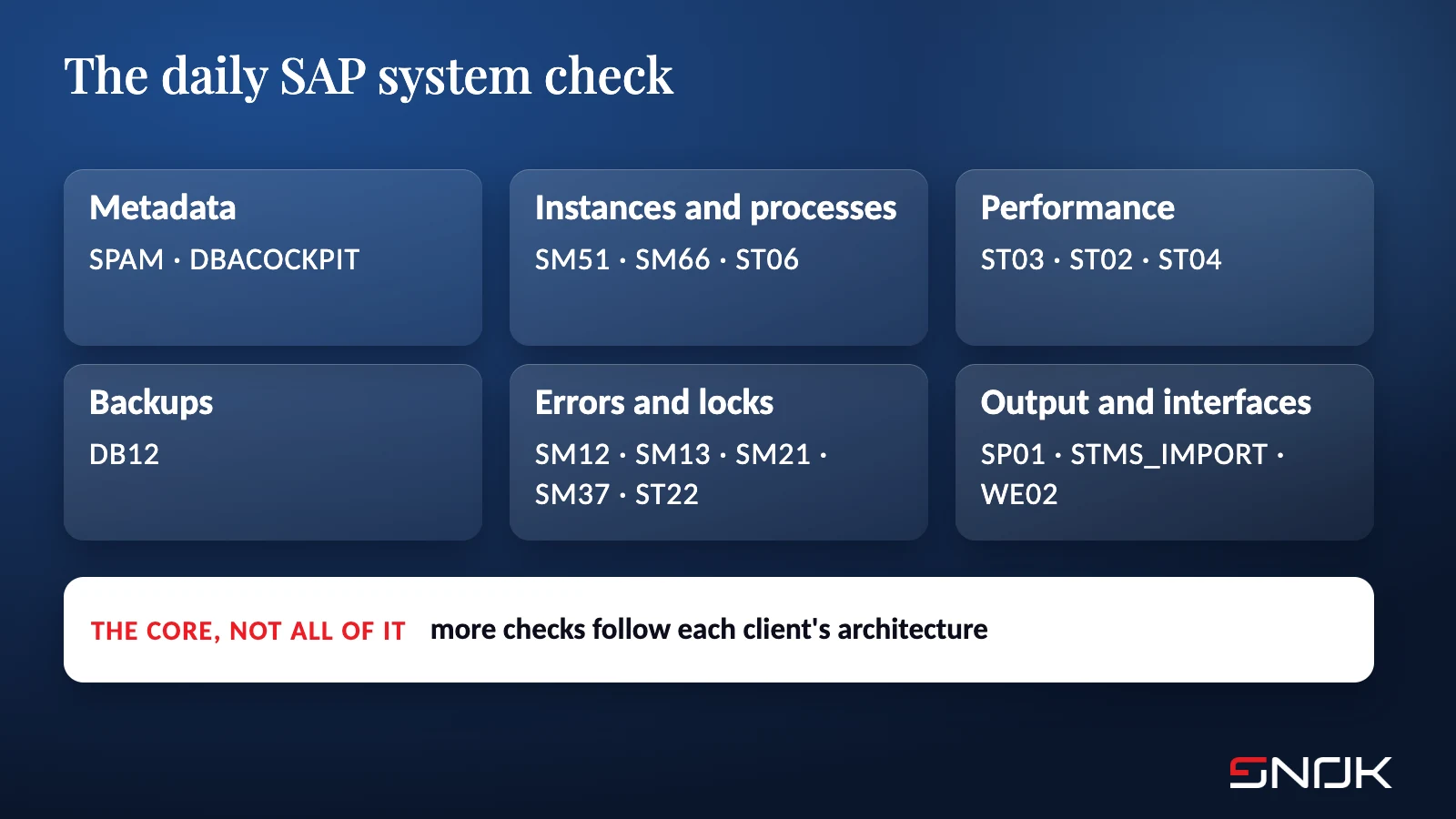
This is the core of the check, not all of it. Each landscape gets additional checks that follow from its architecture, its integrations and the client’s own requirements.
System metadata: SPAM (support package level and product version) and DBACOCKPIT (database version and release). Without these you cannot tell which notes from the next Patch Day apply to you.
Instances and processes: SM51 (instance status across all hosts), SM66 (work processes by status across the system) and ST06 (CPU, paging and free disk space on application servers).
Performance: ST03 (average response time by dialog, RFC, update and background steps), ST02 (buffer hit ratios, buffer swaps, heap memory) and ST04 (database operating status, HA replication, resource usage).
Backups: DB12 (failed data and log backups). A failed backup nobody noticed for a week is the most common reason a recovery plan exists only on paper.
Errors and locks: SM12 (lock entries, including those older than 24 hours), SM13 (failed V1 and V2 updates), SM21 (system log by severity), SM37 (failed background jobs) and ST22 (ABAP short dumps).
Output and interfaces: SP01 (failed spool requests), STMS_IMPORT (stuck transport imports) and WE02 (IDocs by status).
None of this is secret, and the list itself is not where the value lies. The value comes from comparing one day with the next: a double-digit rise in ST03 response times with no change in load, or IDocs stuck in the same status for three days, tells you more than any single reading. Performance tuning draws on the same data. We adjust buffer and memory parameters on the strength of ST02 and ST03 trends, before users start reporting that the system feels slow.
Which SLA terms belong in a SAP Basis support contract
The most common mistake is expecting one number to describe the whole incident. Response time says when someone acknowledges the ticket and starts work. Restoration time says when the system is usable again, even if the root cause is still there. Resolution time covers removing the cause, and it can run to days because it depends on an SAP note or a maintenance window. These are three separate commitments, and each deserves its own definition.
Five things are worth checking before you sign:
Incident classes: whether the contract defines a critical incident - for example, production unavailable to all users - or leaves it to be argued about during the outage.
Measurement: who keeps the clock, and in which tool. If the clock only starts in the provider’s ticketing system, a monitoring alert raised an hour earlier does not exist.
Maintenance windows: when the provider may take the system down, and who on the client side signs off the downtime.
Reporting: what the monthly report contains, and whether it shows trends or just a count of closed tickets.
Exit: which documentation, technical credentials and procedures the provider hands over when the contract ends. It is a dull clause until the day you need it.
Who owns Basis tasks under RISE with SAP
Moving to RISE with SAP shifts the line of responsibility; it does not remove it. SAP runs the infrastructure, operating system, SAP HANA database, backups and technical monitoring. Application configuration, users, roles, the audit log, integrations and custom code stay with the customer.
Two points from SAP’s own material catch most teams off guard. For security patches at the technical Basis layer, SAP prepares tested packages, but under the contract it is the customer who requests deployment and accepts the downtime in a maintenance window. A penetration test, meanwhile, is only allowed at the application layer and only with SAP’s approval. Someone on your side still has to follow Patch Day, assess the notes and raise the requests. That is still Basis work; it has simply moved. We cover this in more detail in our article on secure SAP S/4HANA conversion and RISE with SAP.
SAP Security Patch Day as part of daily operations
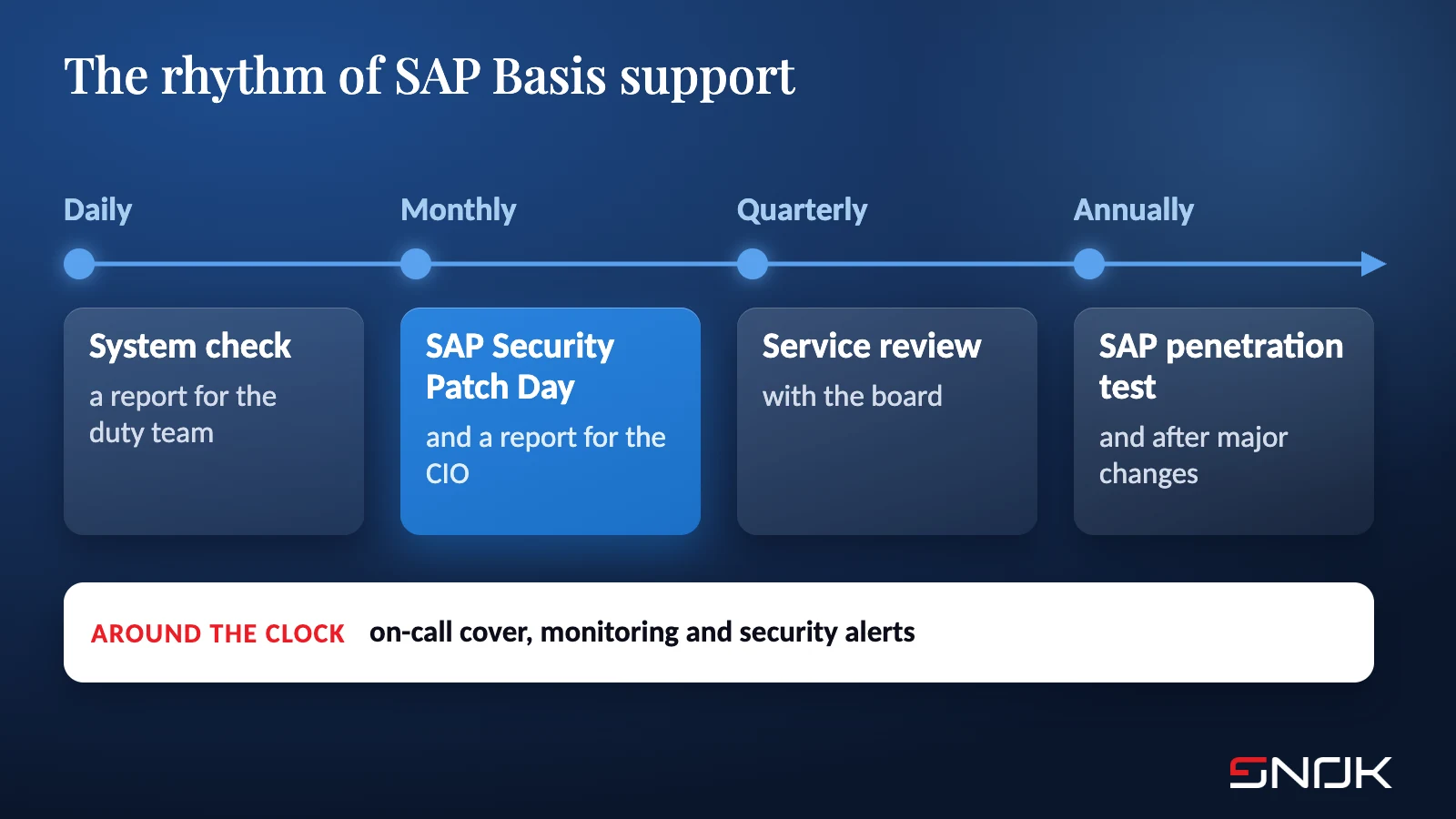
SAP publishes security notes on the second Tuesday of every month. For a Basis team it is a fixed point in the calendar: work out what is missing, assess which notes apply to your configuration, plan deployment through development and test, then schedule the production window. Without support package levels and component versions - the output of the daily check - that assessment is guesswork.
A client we have worked with since 2023 put it well in an interview with ITwiz (translated from Polish): “In many cases only the technical layer, such as the kernel or the database libraries, is updated with any regularity. Updating functional components is more complex […]. The result is that some older components go unpatched for years.” That is why we tie Patch Day to an upgrade plan for the whole landscape, not just the kernel. The monthly cycle is described on our SAP Security Patch Day page.
Hardening, security monitoring and penetration testing in Basis support
SAP’s default configuration is designed to get a system running quickly. Hardening it - switching off services you do not need, tightening security parameters, RFC connections and technical authorisations - is never a one-off project, because any later change can partly undo it. We made that case in SAP hardening is a process, not a project.
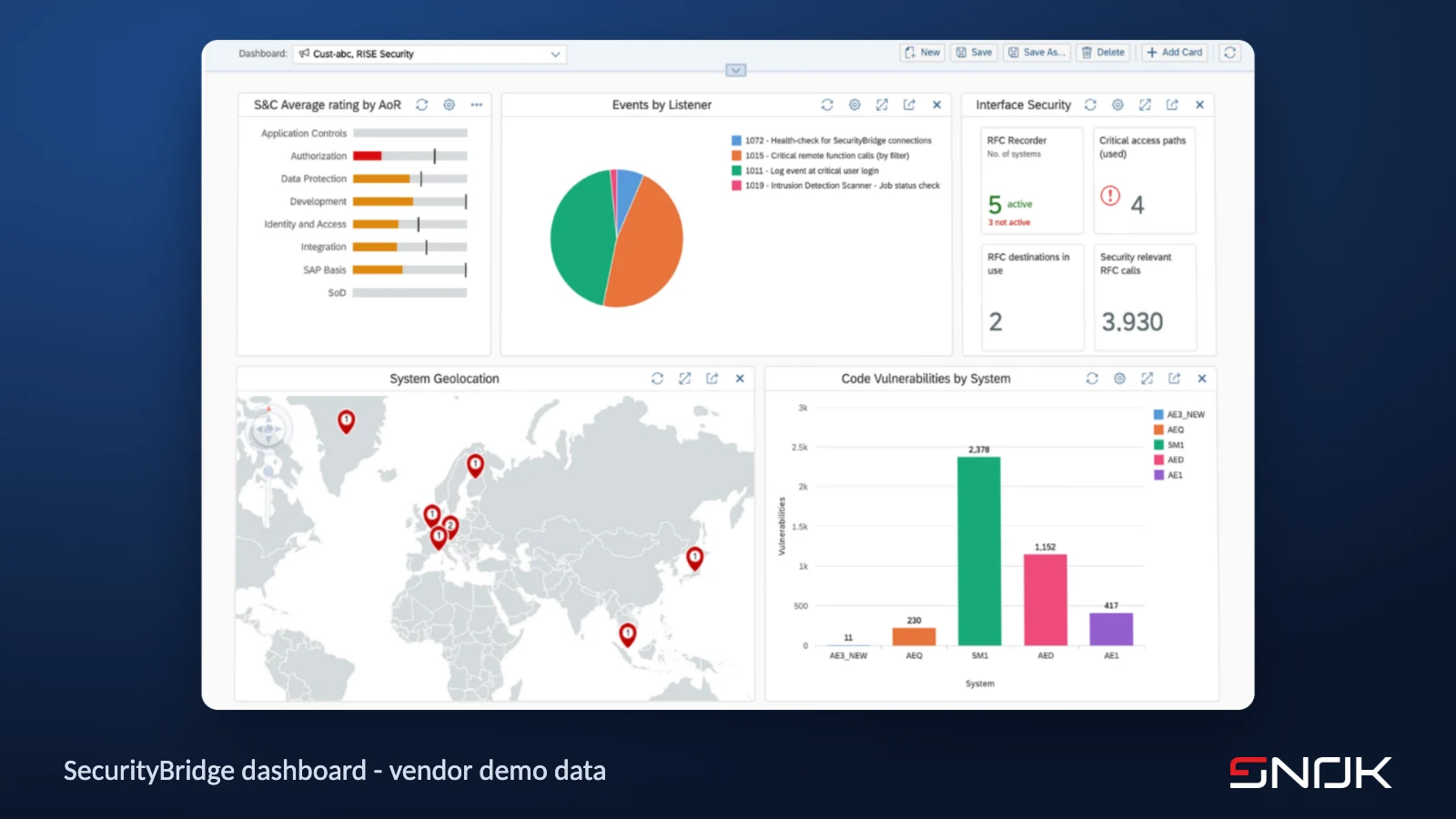
Security monitoring adds a second layer on top of technical monitoring. The SecurityBridge platform correlates events from SAP logs, flags vulnerabilities in installed components and in ABAP code, and can forward alerts to a SIEM. An alert fixes nothing by itself, though. Someone has to pick it up, assess it and act, and the action is usually a configuration change made by the Basis team. When security monitoring and Basis support sit with two different providers, every alert becomes a hand-off between them.
The third layer is a periodic check from outside. An SAP penetration test or a security audit of development, test and production systems shows whether hardening and patching work the way the documentation says they do. We recommend one a year and after every major change, such as a move to SAP S/4HANA. Our testers work with RedLab AI box, an in-house rig running local language models without the refusal filters of cloud services, which helps with configuration and code analysis. Because the models run locally, test data never goes to an external service. All three layers are optional; the scope depends on the risk and the regulation an organisation is subject to.
Basis and security under one roof: Stock Spirits and a retail chain
Stock Spirits Group, a spirits producer operating in nine European countries, has worked with us since 2023. The scope, confirmed by the client in reference letters, covers 24/7 support and maintenance of SAP ERP ECC and SAP S/4HANA together with the SecurityBridge platform, support for the UiPath platform and its bots, and administration and monitoring of environments spread across three physical sites. We also carried out a security audit of the development, test and production systems on both platforms.
In the ITwiz interview, the client’s group manager for IT infrastructure and cybersecurity described the arrangement like this (translated from Polish): “At STOCK we have the added luxury that the SNOK team supports us operationally in SAP Basis, and in most cases it is that team which responds to SecurityBridge alerts.” SecurityBridge went live in production within three weeks, and during the migration to SAP S/4HANA a single licence let the client monitor the new system and the old SAP ECC production landscape in parallel.
At the same client, UiPath bots handle seven recurring administrative processes, and the ERP landscape, with more than 700 users, is under round-the-clock security monitoring. The full story is in the case study.
We run the same model for a DIY retail chain: 24/7 support and maintenance of SAP S/4HANA and the systems around it, with the same scope as at Stock Spirits minus SecurityBridge. The security modules are chosen to fit the client; the service does not depend on them.
SAP Solution Manager after 2027
For many Basis teams, SAP Solution Manager is still the main monitoring tool. Standard maintenance for SAP Solution Manager 7.2 ends with 2027. Customers who take optional extended maintenance for SAP Business Suite 7 until the end of 2030 get extended maintenance for Solution Manager at no extra cost, but only for listed areas: requirements, project and process management, Test Suite, change control, ITSM and landscape management. Monitoring is not on that list. SAP recommends moving to SAP Cloud ALM before the end of 2027.
For a support contract this raises a concrete question: which tool will your provider use to monitor your landscape in 2028, and who will migrate the rules and custom configuration checks? It is worth asking now, while there is still time to do the migration properly.
What a transition from an incumbent provider looks like
We start with an assessment of the landscape: system inventory, configuration, documentation, technical debt and current procedures. That gives us the basis for the SLA, the escalation path and the split of responsibilities - what SNOK does, what stays with your team, and what depends on the cloud or infrastructure provider.
For the first month we work alongside the current team. We learn the operating cycles, the recurring incidents and the undocumented workarounds that every system accumulates after fifteen years in production. From the second month we own the agreed scope, deliver a monthly report for the CIO and run a quarterly service review with the board or steering committee.
How to vet a SAP Basis partner before you sign
A sales presentation tells you little about the quality of day-to-day support. The answers to a handful of questions tell you more:
1. What does your daily system check involve, and can we see a sample report?
2. Who actually takes the alert at night, and how does it escalate to a database specialist?
3. How do you assess SAP Security Patch Day notes, and how many days pass at your clients between a HotNews note being published and going live in production?
4. Who responds to security alerts, and is it the same team that makes the configuration changes?
5. Which tool will you use to monitor our landscape once standard maintenance for SAP Solution Manager ends?
6. What will you hand over to us when the contract ends?
A fuller version of these questions, together with service scope, incident classes and exit criteria, is in our downloadable SAP Basis support transition checklist.
How SNOK can help
We run SAP Basis 24/7 as a managed service: monitoring, patching and SAP Security Notes, performance tuning, change and transport management, SAP HANA administration and round-the-clock incident handling. On request we add SecurityBridge security monitoring, configuration hardening and periodic SAP penetration testing. We support on-premise and cloud landscapes, including RISE with SAP, and for customers leaving SAP ECC we handle the conversion to SAP S/4HANA. Our partnerships with SUSE and Lenovo cover the operating system and hardware layers.
If you are planning a change of support model or provider, start with the SAP Basis support transition checklist. When you are ready to talk, book a 30-minute call with our team. We will go through your current SAP landscape, the SLA you need and what belongs in scope. For the wider security picture, see our book SAP Cybersecurity from A to Z.
Sources
- ITwiz, Udany atak na systemy SAP może zatrzymać każdy biznes (“A successful attack on SAP can bring any business to a halt”), Executive ViewPoint (partner feature), 26 June 2025, in Polish - itwiz.pl
- SAP, SAP Solution Manager 7.2 - maintenance and transition to SAP Cloud ALM, SAP Note 3255311 - support.sap.com (accessed 6 October 2026)
- SAP Community, Jana Subramanian, RISE with SAP S/4HANA Cloud, Private Edition: Cybersecurity FAQ Explained - community.sap.com
- SNOK, case study Mission-critical ERP under 24/7 protection - snok.ai