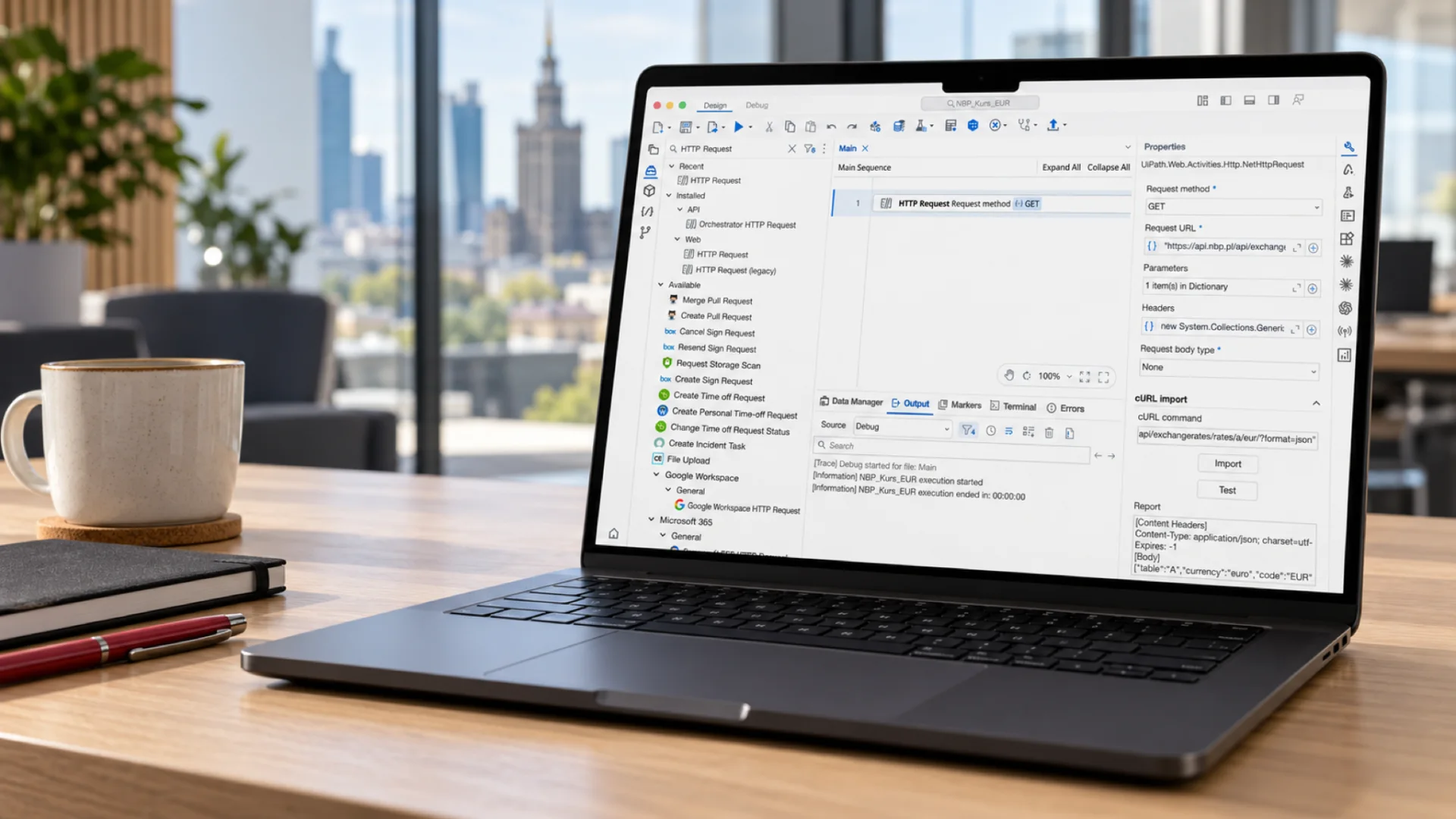

You can now build UiPath automations on a Mac without a Windows machine anywhere in the loop. On 1 October 2026 UiPath released Studio for macOS as a Public Preview. On Apple silicon Macs running macOS 14 Sonoma or later, developers can design, run and debug cross-platform automations and publish them to UiPath Orchestrator. We installed the new build and used it to create a small bot that fetches the euro exchange rate from the public API of Narodowy Bank Polski, the Polish central bank. The whole run takes forty seconds and is shown in the video below.
What did UiPath release on 1 October 2026?
The release has two parts. One is Studio itself, listed in the release notes as a Public Preview. The other is the UiPath Platform Installer for macOS, also a Public Preview, which installs Studio together with UiPath Assistant and keeps both up to date. Studio relies on Assistant to sign in and to run automations. The installer package is available from the Resource Center in UiPath Automation Cloud.
IT teams will care about one more detail. Administrators set governance policies through a configuration profile pushed by their MDM solution, so a Mac running Studio joins the managed fleet the same way as any other corporate application.
The requirements are short: a Mac with an M1 chip or later, macOS 14 Sonoma or later and at least 8 GB of free disk space. Intel-based Macs are not supported. Shortcuts follow macOS conventions, with ⌘R to debug, ⌃⌘R to run and ⇧⌘P for the command palette.
Why a Mac version of Studio matters to enterprises
Macs left the design studio a long time ago. Developers, analysts and executives use them, and so do whole teams at companies that let employees pick their own laptop. A Censuswide survey commissioned by MacStadium in September 2025 points the same way: of 300 US CIOs, 93 percent reported growing use of Apple devices over the previous two years and 96 percent expected their Mac fleet to grow within 12 to 24 months. The sponsor sells Mac infrastructure and the sample covers the US only, so we read it as a direction of travel rather than a market measurement.
Automation tooling lagged behind that shift. A UiPath developer with a Mac could work in Studio Web in the browser or run Studio Desktop in a Windows virtual machine. The first option was not a full development environment. The second meant another operating system licence, more memory and one more machine to maintain.
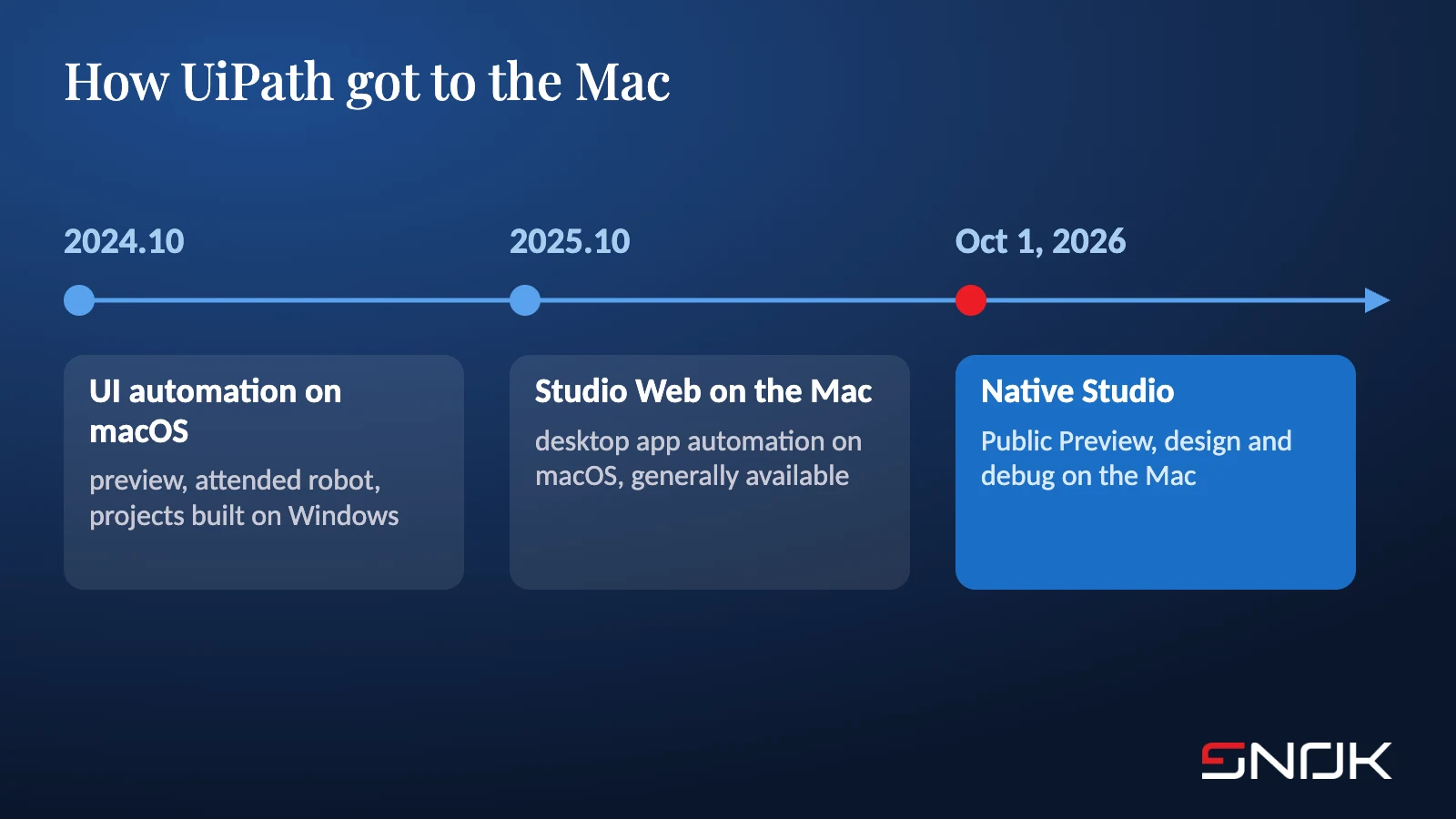
UiPath has been closing the gap step by step. Release 2024.10 introduced native macOS UI automation as a preview: attended automations ran on a local robot through macOS Assistant, while developers still built them in Studio on Windows. Release 2025.10 made desktop app automation on macOS generally available, designed in Studio Web. Full Studio on the Mac was the missing piece, and it has now arrived. UiPath is catching up with a market where the Mac has become an ordinary work computer.
How we built the first bot on a Mac
The recording shows Studio 2026.0.202 STS on an Apple silicon MacBook. The project is a standard C# process with cross-platform compatibility, which is the only project type Studio on macOS will open. The bot has a single job: retrieve the current average EUR rate from NBP table A.
Anyone who has built a process in Studio on Windows will recognise every step. We create a process, set its name and language, add the HTTP Request activity from UiPath.WebAPI.Activities and paste the request as a cURL command, which the import feature splits into the URL and query parameters. The Test button sends the request at design time and shows the JSON response with table A and currency code EUR. When the process runs, the Output panel logs the start and the end of the execution.
The example is deliberately simple. It still covers the full developer loop on a single machine: building the project, testing the integration, running and debugging, with no Windows box behind the scenes.
What works on the Mac and what stays on Windows
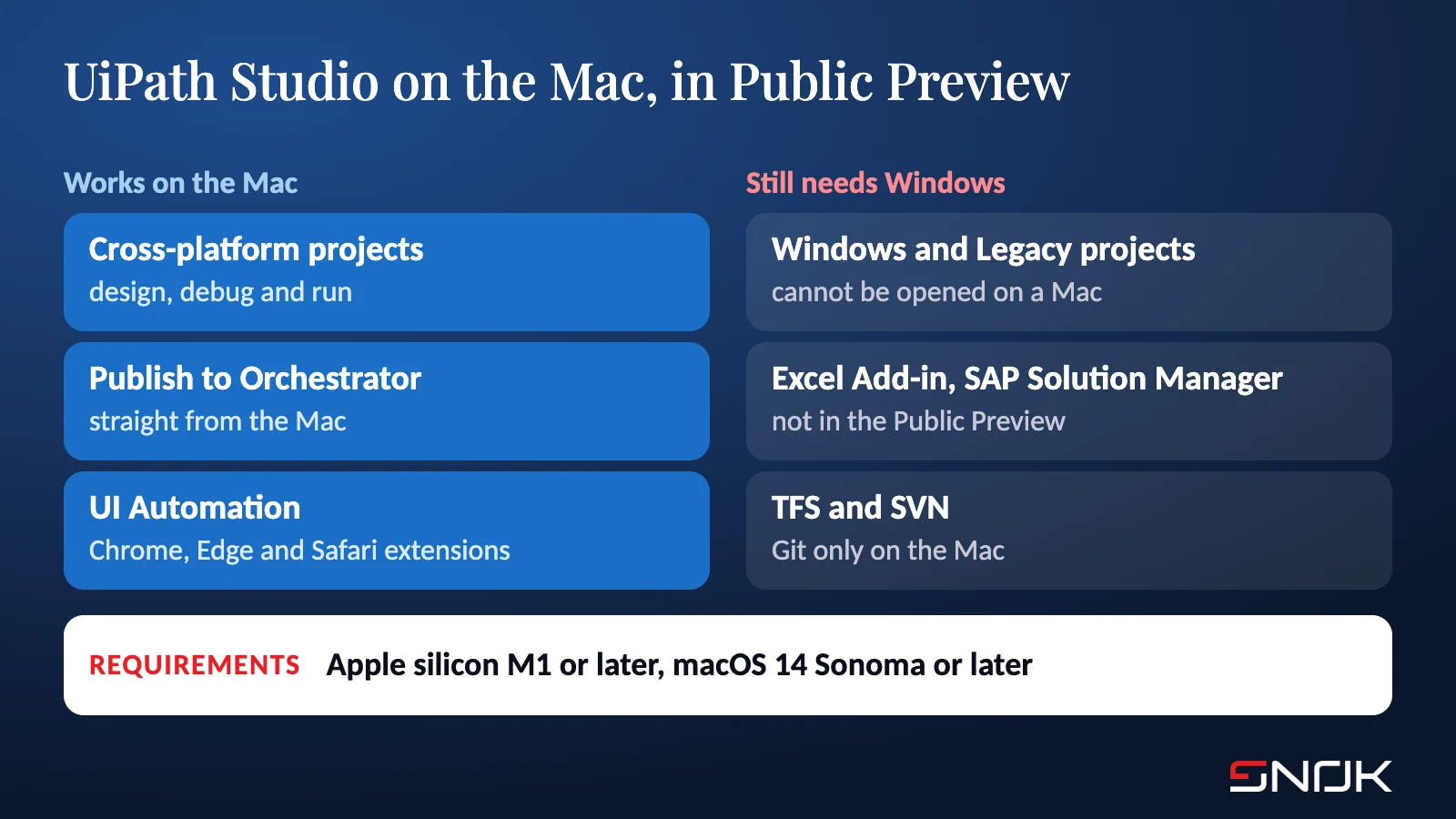
Works on the Mac. Designing, running and debugging cross-platform projects, publishing to UiPath Orchestrator, and UI Automation. The first time you indicate a UI element, macOS asks you to grant permissions to UiPath UIAutomation under Privacy & Security. UI Automation requires UiPath.UIAutomation.Activities 26.10 or later, and browser extensions are offered for Chrome, Edge and Safari.
Stays on Windows. Windows and Windows - Legacy projects cannot be opened on a Mac. The Public Preview has no Excel Add-in, no SAP Solution Manager plugin and no Repair Tool for Microsoft Office. Git is the only supported source control, so TFS and SVN are out. Automatic generation of test data variations is not available, and screen reader support is limited.
That splits the work in a predictable way. New cross-platform automations, API integrations and browser automations can be built on a Mac today. Processes that depend on SAP GUI, desktop Excel or older Windows projects remain on Windows workstations or on unattended robots running in virtual machines.
Who should try the Public Preview now?
UiPath states plainly that Public Preview features are not recommended for production use, and it has not announced a date for general availability. A sensible plan for the coming months is a pilot with a development team that already works on Macs, limited to new cross-platform projects, with packages published to Orchestrator and production runs kept on the existing robots. In parallel, it is worth auditing the automation portfolio to see which processes are already cross-platform and which still need migrating from Windows - Legacy, since those numbers decide how much work can realistically move to Macs.
Studio on the Mac fits a pattern we have followed for a while. UiPath Delegate already runs on both Windows and macOS, and UiPath has opened its platform to coding agents such as Claude Code and Codex. UiPath’s developer tooling no longer assumes a single operating system. If you are curious how a Mac copes as a machine for local AI experiments, see our post on 512 GB under the desk.
SNOK is a UiPath Platinum partner and we work on the latest releases of the platform. If you are planning a Studio pilot on Macs, or want to find out which of your processes are ready for cross-platform projects, have a look at our business process automation offering or our UiPath practice page and get in touch.
Sources
- UiPath, Studio Release Notes, October 2026, entry of 1 Oct 2026 “Studio on macOS (Preview)” - https://docs.uipath.com/studio/standalone/latest/release-notes/october-2026 (accessed 3 Oct 2026).
- UiPath, Studio User Guide, “Studio on macOS (Preview)”: requirements, project types, shortcuts and known limitations - https://docs.uipath.com/studio/standalone/latest/user-guide/studio-on-macos (accessed 3 Oct 2026).
- UiPath, Platform Installer Release Notes, October 2026, “macOS support (Preview)” - https://docs.uipath.com/uipath-platform-installer/standalone/latest/release-notes/october-2026 (accessed 3 Oct 2026).
- UiPath, Studio User Guide, “About macOS UI Automation”: preview from 2024.10 and general availability of macOS desktop automation from 2025.10 - https://docs.uipath.com/studio/standalone/latest/user-guide/about-macos-ui-automation (accessed 3 Oct 2026).
- Computerworld, “MacStadium sees Apple adoption accelerating across US enterprises”, 25 Sep 2025, Censuswide survey of 300 US CIOs for MacStadium - https://www.computerworld.com/article/4063294/macstadium-sees-apple-adoption-accelerating-across-us-enterprises.html (accessed 3 Oct 2026).
- NBP, exchange rate API, table A, EUR - https://api.nbp.pl/api/exchangerates/rates/a/eur/?format=json (accessed 3 Oct 2026).
- SNOK recording, UiPath Studio 2026.0.202 STS on macOS, project NBP_Kurs_EUR, 3 Oct 2026.