

Six weeks ago we wrote about Delegate as an announcement. It sat on UiPath Labs marked “coming soon”, with no documentation page, no installer and no published licensing model. We argued at the time that this was the convenient moment to prepare your decisions, because you could make them before launch rather than during it.
That window has closed. Delegate has been in public preview since 26 August. It has a product guide running to over forty pages under its own name - the Delegate & Cartographer user guide - an installer, three profiles, a consumption meter and a full set of governance policies in Automation Ops. You can install it today.
There is also a signal that got lost in the launch coverage and is worth more than the launch itself. The Automation Cloud release notes for the second half of August carry one sentence:
“Task Mining in Automation Cloud Public Sector is being retired, effective September 1, 2026, to redirect resources toward Delegate - Cartographer.”
A vendor is retiring a working product to move a team onto Delegate. That is not marketing copy; it is a resourcing decision written into release notes. Delegate has stopped being an experiment beside the platform and become part of it.
What follows is the product taken apart: what it does, what it is made of, what you need in place, what it costs, and - most importantly - which settings have to be decided centrally before the first MSI reaches the first workstation.
What Delegate is, in the vendor’s own words
The sentence that opens the documentation is dense and worth reading literally:
“Governed AI agent on your desktop that completes tasks from plain-language instructions, can be taught a task by watching you do it once, and builds on your organization’s existing automation.”
Three things in one sentence. The agent is governed, it takes instructions in plain language, and it learns by watching. The fourth thing is in the tail and matters most to you: it builds on what you already have. Delegate calls the automations published in your tenant and uses your queues, assets and permissions. There is no second set of entitlements to maintain.
The same page carries a warning you should not skip when planning: “Delegate is in Public Preview. Features and behavior may change before general availability.”
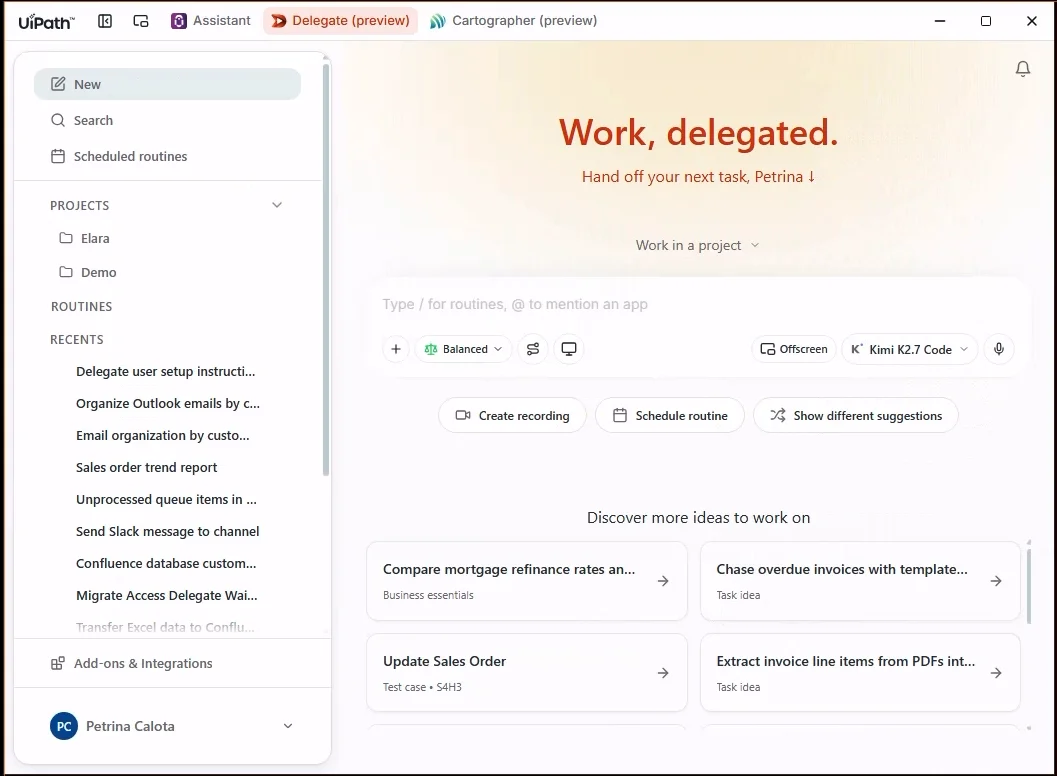 The main Delegate window. The title bar switches between Assistant, Delegate and Cartographer; the row under the composer holds the entire control layer. Source: docs.uipath.com, Delegate & Cartographer user guide, accessed 12 Sep 2026.
The loop
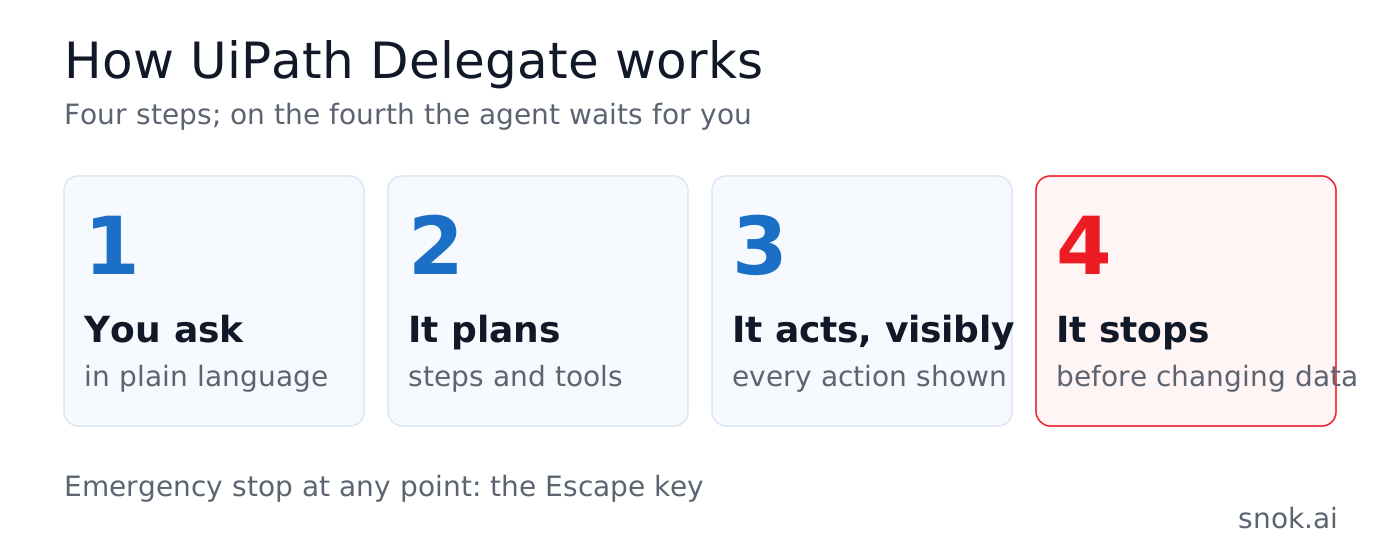
The documentation describes the work in four steps, and those four steps are the whole architecture in miniature.
- You ask. In plain language, in a session.
- Delegate plans. It works out the steps and the tools it needs.
- It acts, and shows you. Every action is visible as it happens. You can interrupt, correct or redirect at any point. The emergency stop is the Escape key.
- It stops when it should. Actions that change data, send messages or reach into sensitive systems wait for your confirmation, depending on your execution mode and on what your organisation allows.
Step four is what separates Delegate from a general-purpose assistant. It is not model politeness or a well-written system prompt - it is the authorisation layer described further down.
What it does
The vendor lists five classes of task, and each carries a different risk profile, so they are worth keeping apart.
Work that crosses systems. Pull a figure from a report and check the related CRM record, triage mail and calendar first thing, draft the follow-up once the rest is done. Delegate handles the whole chain instead of returning one step.
Learning by demonstration. “Perform a task once while Delegate watches, and it completes the remaining records.” The vendor’s own justification is unusually candid: this is useful where a system has no usable API and a full automation would cost more than the task is worth. In other words, Delegate aims at the work that never cleared the business case in a classic RPA project.
Turning data into a deliverable. A spreadsheet, a database export or a folder of files becomes a presentation, a proposal or a report, with your formatting applied.
Working through a system’s own interface. This is new since July. Where the system on the other side offers it, Delegate renders that system’s real screens inside the conversation - lists, forms, tables, dashboards - and forms arrive filled in with sensible values. The mechanism is called MCP Apps. You change only what matters instead of describing every field in chat.
Saving and reusing. A successful session is saved as a Routine - more on that below.
Three profiles in one application
Delegate installs alongside UiPath Assistant and switches in the title bar. Which profiles you see depends on what your administrator has enabled.
General Productivity is the default experience, for every employee: working across applications, files and web services.
Cartographer is for business analysts. It documents the current state, designs the target one, and generates the delivery documents from both.
Delegate for Testing is for QA teams. It reviews results, triages failures and runs manual test cases.
Cartographer, the successor to Task Mining
This is the profile named in the release note quoted above. The vendor calls its long-term goal the Map of Work: “a single, versioned, governed definition of how the business runs, so specifications, sign-off, and audit are generated from one source of truth instead of drifting documents that disagree with reality.”
The ambition, then, is that specification, sign-off and audit come from one source rather than diverging across documents that no longer match reality. Anyone who has run a delivery project for more than a year knows the problem.
Today Cartographer builds a process model from whatever is available - transcripts, interviews, SOPs, recordings - flags the gaps, proposes a target state and produces two documents: a PDD as a .docx for sign-off, and an SDD in Markdown aimed at coding agents. It has its own equivalent of a project, called a Business Process, and a way to delegate a question to a colleague: you send a link, they answer in their own Delegate, and the reply returns to your conversation to be accepted into the project’s knowledge or rejected. The condition is the same organisation and the same tenant.
The method changed here, not just the product name. Task Mining gathered evidence about work by recording activity at workstations. Cartographer gathers it from conversations, documents and recordings, and hands back a finished design document.
Delegate for Testing
The QA profile handles the work that surrounds testing: reviewing results, triaging failures, collecting logs and screenshots, updating defects, producing reports. It also runs manual test cases from first step to last and reports results back to Test Manager, attaching artefacts to step logs - which matters, because those artefacts are your evidence in an audit.
Communication with Test Manager runs through the UiPath CLI (uip), so the CLI has to be installed and authenticated. Licensing comes from Test Cloud: AppTestDeveloper or AppTesters. The Test Cloud plugin is enabled under Settings → Skills & tools → Plugins.
One caveat straight from the documentation, so nobody plans around a misunderstanding: Testing “runs today inside the general-purpose experience rather than as its own separate profile”. It is a tuned set of skills inside general Delegate, not a separate application.
If you work on SAP regression, this connects directly to what we wrote about release confidence in SAP testing.
How you teach it
Teach and Run
Four steps and one important property.
- You say what you want to teach.
- You perform the task on the first record while Delegate watches - this requires screen context to be on.
- Delegate sums up the pattern it recognised and you correct it.
- Once you confirm, it completes the remaining records.
The property is in the limitations the vendor lists itself: the mechanism needs a consistent pattern across records, it asks when something is ambiguous, and it stops on a record that departs from the pattern. That is not a defect, it is the design. An agent that guesses on an unusual record instead of asking is far worse news than one that halts.
Routines - where it gets serious
A Routine is a saved session with three elements: a trigger (a plain-language description of when to use it), inputs (typed parameters) and an output (the format of the result), plus the steps.
You can create one three ways: from a successful session with “Save as Routine”, from scratch in settings, or by hand - as a SKILL.md file in the LocalSkills directory (%APPDATA%/UiPath/Delegate/LocalSkills/ on Windows). That third route means a Routine is a text file you can keep in a repository, version and review.
A Routine runs from the sidebar, by mention in a conversation, or from a keyboard shortcut. It can be scheduled - once, daily, weekly or monthly, at a set time in the local zone, with fixed values or a prompt at start, running in the background with error handling. It can be exported to a ZIP or to the bare SKILL.md and handed to someone else.
This is the point to pause the enthusiasm. A Routine with a schedule, parameters and saved connections is production automation. If it is created on a workstation, outside Orchestrator and outside any register, then six months later you have a second automation layer nobody has inventoried. The vendor flags something that confirms it: scheduled Routines use saved connections, so expired authentication simply breaks the run - and somebody has to notice.
There is also a Delegate Store - a catalogue of ready-made skills and routines, “tested, documented, supported, and versioned by UiPath or trusted publishers”, installed in one click. Organisations can add their own feed by URL. The documentation lists red flags to check before installing, and one of them will sound familiar to anyone who has looked at AI plugin security recently: “requests tools unrelated to its stated purpose”. That is exactly the category we covered in the questions worth asking a vendor.
What it connects to
Integration Service carries authenticated connections to cloud applications - Outlook, Gmail, Google Workspace, Slack, Teams, Jira, Confluence, GitHub, Salesforce and the rest of the catalogue. It acts with your permissions, without exposing passwords and without browser automation.
MCP servers cover what no connector reaches: in-house APIs, local databases and tools with no ready integration. They run remotely over HTTP or locally, as a process on the machine. Once enabled, Delegate discovers the exposed tools itself.
MCP Apps render a system’s real screens inside the conversation.
The UiPath platform hands over what you already have: the automations published in your tenant, queues, assets, permissions, Orchestrator, Studio, Context Grounding and Test Manager.
Skills and Plugins extend Delegate itself. A Skill is one capability; a Plugin bundles the skills for a single product or profile, such as Test Cloud.
The distinction between Integration Service and MCP is practical: take the connector where one exists, because it carries platform authentication and permissions; take MCP where none does - in-house APIs, local databases, experimental integrations. And MCP is precisely the category that regulated environments switch off by default in policy.
Three control levers
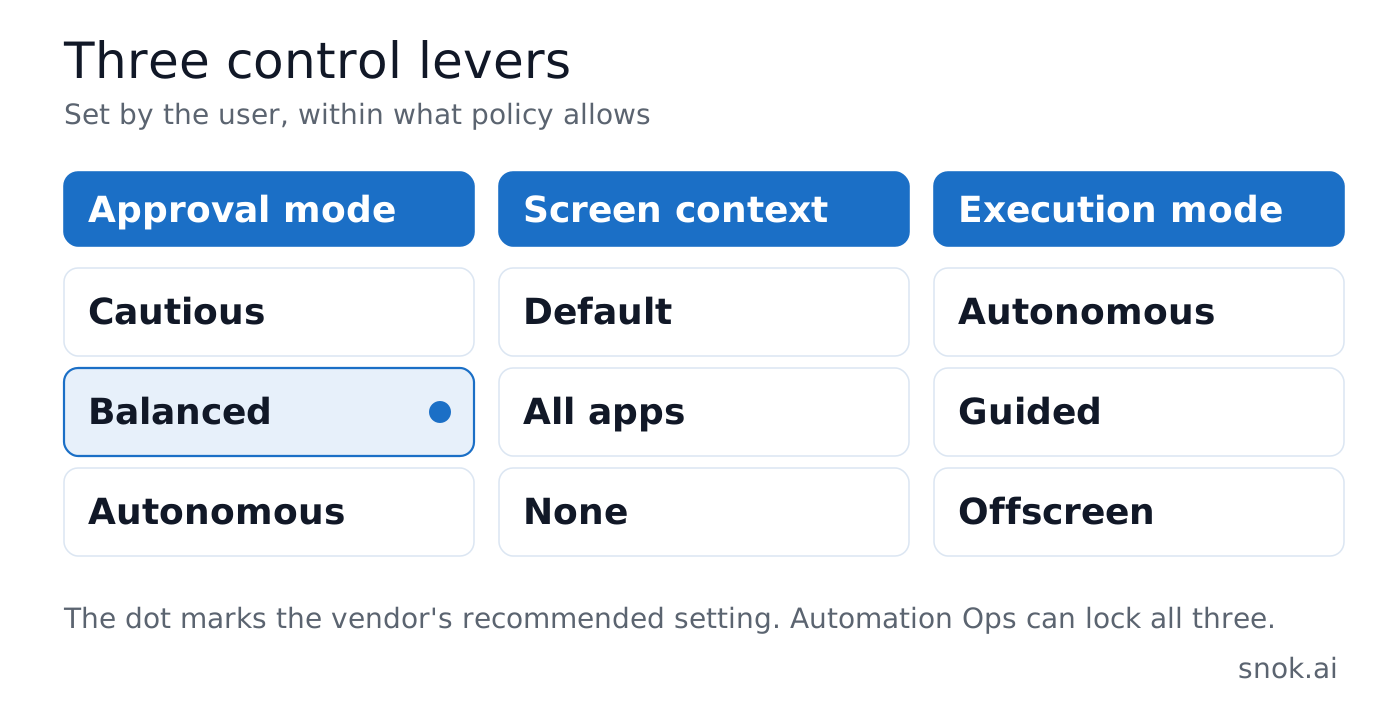
This is the heart of the product. The user has three switches right beside the composer - within whatever the organisation’s policy allows.
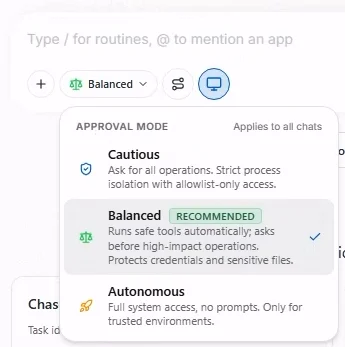 Approval modes. Balanced carries the vendor’s “recommended” label. Source: docs.uipath.com, Delegate & Cartographer user guide, accessed 12 Sep 2026.
Approval mode applies to all chats and has three settings. Cautious asks for every operation and works in strict isolation with allowlist-only access. Balanced, the vendor’s recommendation, runs safe tools automatically, asks before high-impact operations and protects credentials and sensitive files. Autonomous is full system access with no prompts - described in the documentation as being for trusted environments only.
Screen context decides what Delegate sees: only the apps attached to the current chat (Default), every visible application (All apps), or nothing (None, with the option to ask you to turn it on). There is one related setting that is easy to miss and matters to any privacy assessment: in the default mode, the first message of each turn gets one full-screen capture, so that “just do this for me” works from a cold start. Subsequent turns are masked to the attached apps. On by default.
Execution mode decides how it acts: Autonomous takes over your screen, Guided takes over but asks before every interaction, and Offscreen works without touching the screen - in a local session, web only, or natively in the background.
Beneath these sits a fine-grained layer in Settings → Security: tool permissions on an Allow/Ask/Block scheme, separately for read and write; a shell sandbox with allowed paths and blocked commands; protected files, meaning secrets, keys and credentials; and trusted and blocked applications and sites for UI automation.
The permission boundary
Two things are worth remembering, because they come up in every risk conversation.
Delegate runs in the context of the signed-in user and does not elevate. On Windows it cannot drive applications running as administrator. Code execution goes into a kernel sandbox - AppContainer on Windows - which isolates the file system, the network and process access, and whose strictness depends on the approval mode in force.
Settings are stored in two layers, and that is a deliberate design decision. The plain settings.json holds appearance, model choice, shortcuts and behaviour preferences. The encrypted secure-settings.enc - protected by DPAPI on Windows - holds tool permissions, tokens and policies, and can only be changed through the interface. The point of the split is clear: a compromised agent has no route to raising its own permissions by editing a configuration file.
What happens to your data
This is the section usually read last. It should be read first.
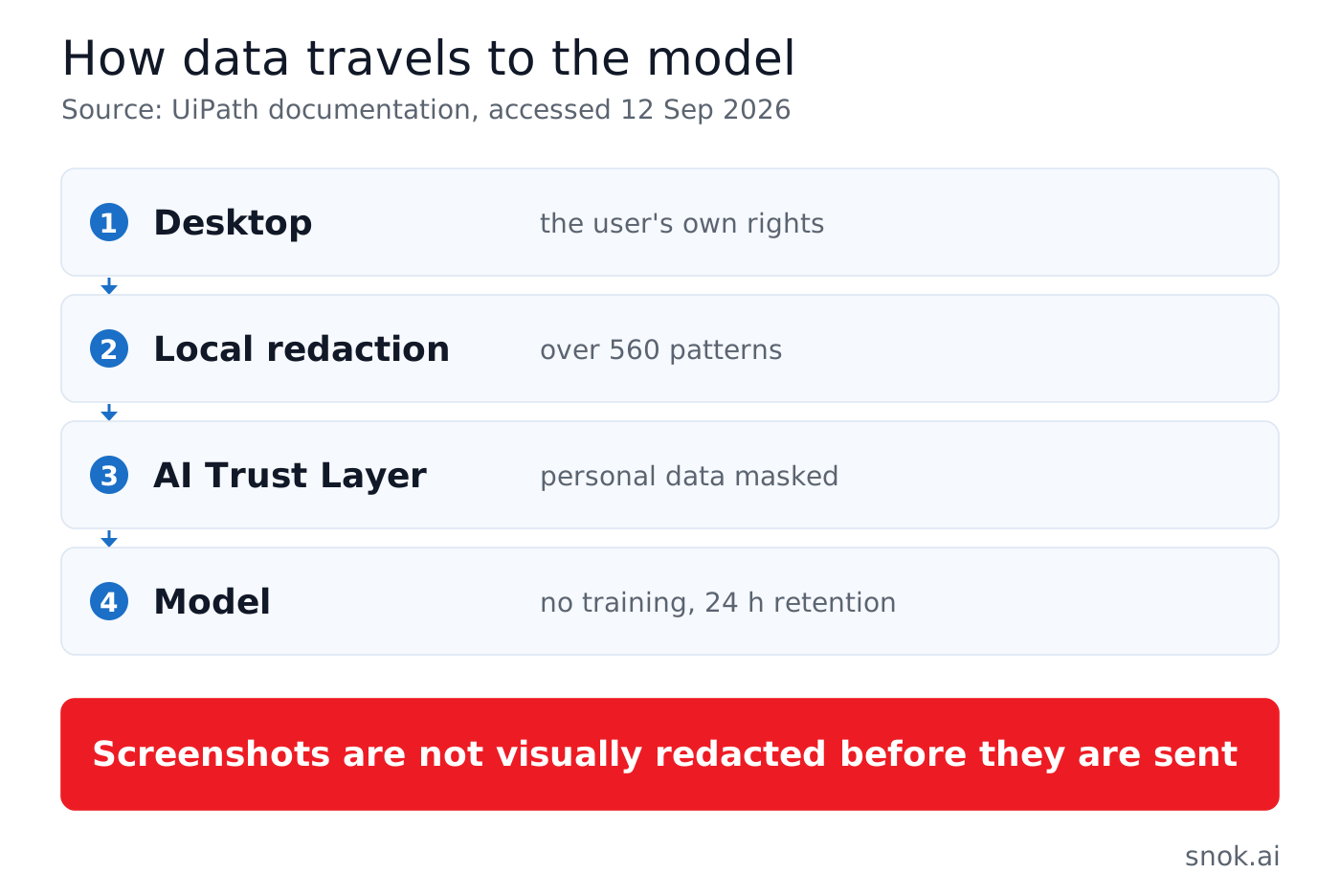
What reaches the model. Literally: “The content a task needs, including screenshots, is processed by a model.” The route runs through the UiPath AI Trust Layer - an encrypted, authenticated service-to-service connection - or through your organisation’s own model.
Whether your data trains models. It does not, and this is contractually prohibited. Model vendors “don’t retain your data beyond short-lived, in-memory processing” - typically minutes, at most 24 hours.
Redaction before sending. On the device, before the model sees anything: “Secrets and personal data are removed from tool output before the model sees it” - over 560 patterns, from API keys to personal data, IP addresses and card numbers. The AI Trust Layer additionally pseudonymises personal data before transmission.
And here is the catch, stated plainly. Redaction works on tool output and masking works on text - but screenshots are not visually redacted before they reach the model. If an employee’s screen shows a patient list, a payroll table or a screen from a client system under an NDA, that image travels whole. This is not a flaw in the product; it is the consequence of a computer-use agent needing to see the screen. But it is a decision you must make knowingly rather than discover afterwards.
Where conversation history lives. “By default, conversation history is stored in UiPath Automation Cloud.” Local mode keeps it on the user’s machine. A user deletion is a hard delete, and an organisation can request deletion at its own level, which covers an Article 17 GDPR request. UiPath support reaches this data “only, with your explicit approval, and every access is tracked and logged”.
The remaining parameters. TLS 1.2+ in transit and AES-256 at rest. Outbound HTTPS only, to UiPath domains - no inbound connections - with support for system proxies and enterprise root certificates. Telemetry carries operational signals only: errors, timing, feature usage, with no conversation content and no screenshots. On prompt injection, the model is expected to resist instructions found on web pages, but the vendor does not rely on that alone: authorisation rules and the sandbox apply regardless, and the AI Trust Layer adds optional detection.
Certifications are inherited from Automation Cloud: SOC 1 and SOC 2 Type 2, ISO/IEC 27001, 27017, 27018 and 42001 for AI management systems, plus HIPAA, HITRUST, C5, IRAP and Cyber Essentials Plus, with GDPR compliance and a published subprocessor list.
What the documentation does not give: the specific processing regions for model calls. It points to the “AI features and model routing” configuration at tenant, product and feature level. If you have a residency requirement, that is your first question to UiPath, not to the documentation.
Which model underneath
Delegate is not built around one vendor. The models listed in the documentation:
| Vendor | Models |
|---|---|
| Anthropic | Claude Sonnet 5, Claude Opus 4.8 |
| Azure OpenAI | GPT-5.6 Sol, GPT-5.6 Terra, GPT-5.6 Luna |
| Gemini 3.6 Flash | |
| Moonshot AI | Kimi K2.7 Code |
An organisation can bring its own model, and the vendor says plainly when that makes sense: where a contract, a regulator or a data-residency requirement demands it.
One operational detail matters: a model must be enabled both in AI Trust Layer → Models and permitted by an Automation Ops policy. “AI Trust Layer is the source of truth: if a model is allowed by policy but its provider is disabled in AI Trust Layer, it is not available.” So when a model fails to appear, check the AI Trust Layer before the policy.
Central governance - where your decisions actually live
Policies are created in Automation Cloud → Automation Ops → Governance and targeted at users, groups or tenants. Three properties to know before you plan a rollout:
- When they take effect: at the next app start or new conversation, propagating within 30 minutes.
- How they behave: “Settings are re-applied from the live policy every time, and are never stored as the user’s own choice.” A user cannot permanently override them.
- On conflict: the most specific policy wins.
The scope is broad. Centrally you set which tool categories are available and the restrictions on paths, commands, sites and applications; whether delegation to helper agents is allowed; which MCP servers are provisioned and whether users may add their own; a lock on approval mode and screen context; an organisation-wide instruction prepended to every prompt; permissions per operation with read and write separated - the vendor’s own example is blocking email deletion while allowing sending; the default and permitted models; and finally whether Context Grounding indexes are allowed.
The vendor also publishes a baseline for regulated environments, and it deserves to be treated as a starting point rather than an inspiration: approval mode set to Cautious and locked, execution without administrator rights, destructive operations set to reject, the scripting sandbox enabled with folder-only grants, MCP disabled by default, credentials held in Orchestrator, and conversation storage kept local.
This is the same logic we described around the human approval gate in Maestro: the control is whatever refuses to execute at the moment of action, not the document describing what should not be done.
What you need in place
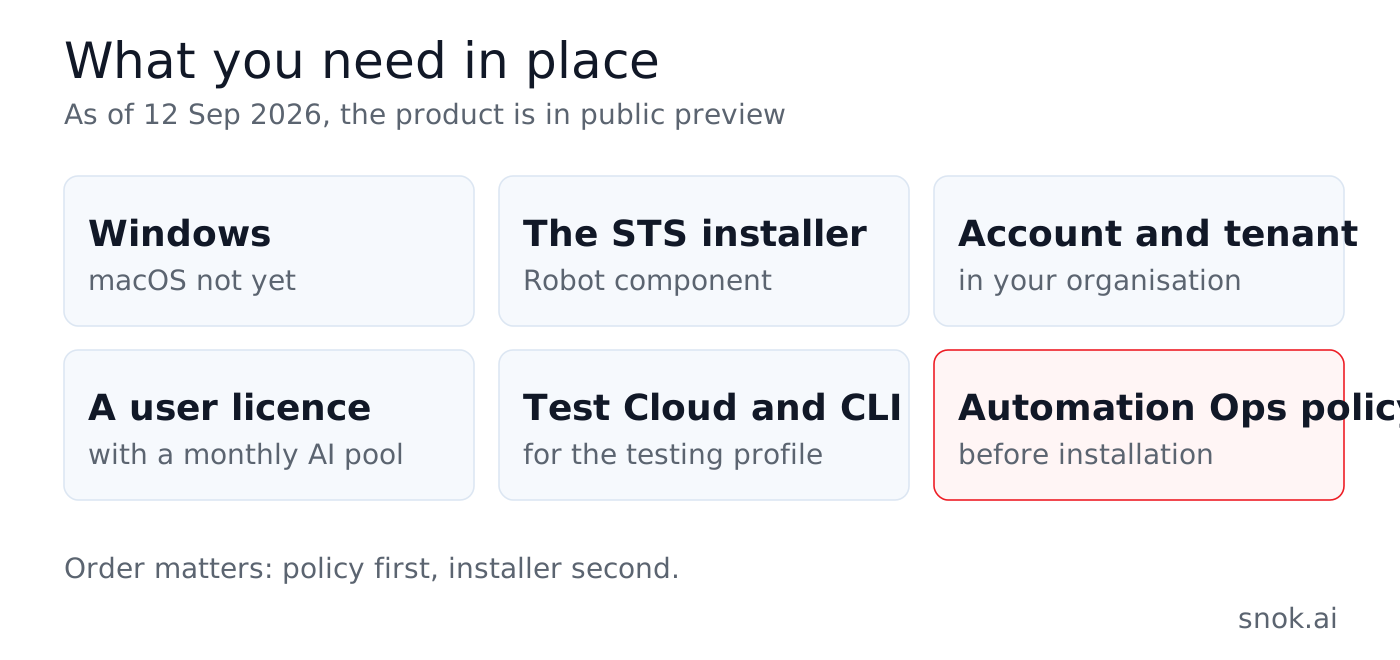
The operating system. There is a discrepancy here worth naming, because the optimistic version is in circulation. The UiPath forum announcement of 26 August mentioned Windows and macOS. The product documentation says something else, verbatim:
“You can currently install Delegate on Windows only, through UiPathPlatformSTS.msi. macOS support is not yet available.”
The documentation is the newer and more specific source, so we take its version. The groundwork for macOS is visible throughout it - ~/Library/Application Support paths, TCC permissions, the Seatbelt sandbox - so the direction is settled. There is no date. If you were planning a pilot in a team working on Macs, that is a blocker, not an inconvenience.
Prerequisites. A UiPath account in your organisation’s tenant, a machine meeting the hardware and software requirements, and an internet connection.
The install. You download UiPath Robot & Assistant Latest STS (Continuous Release) from the Customer Portal or from Automation Cloud. Run the installer, select the Robot component, add Extensions - the vendor recommends it, because several Delegate capabilities rely on them - accept the licence and install. Then sign in to your organisation, pick the tenant and check the status: “Once you are connected and licensed, a green status light appears in the title bar next to your initials.” The switcher between Assistant, Delegate and Cartographer sits in the title bar next to the UiPath logo.
Updates. Delegate is maintained by the UiPath Platform Installer - a roughly ten-megabyte application that keeps Studio, Robot, Assistant, Delegate and the browser extensions on one aligned version and downloads only the differences, in the background. Channels: Enterprise STS for the latest features, Enterprise LTS as the stable line with patches only, and Community. One thing is missing and belongs in your plan: there is no automatic rollback - a failed update leaves the previous version in place.
For the testing profile, additionally: a Test Cloud licence in the AppTestDeveloper or AppTesters variant, an installed and authenticated UiPath CLI, and the Test Cloud plugin enabled.
What it costs
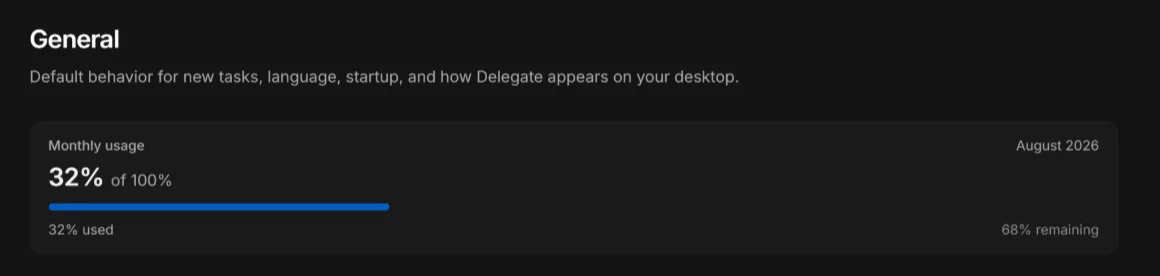 Remaining allowance under
 Settings → General. Source: docs.uipath.com, Delegate & Cartographer user guide, accessed 12 Sep 2026.
The model is simple in construction and non-obvious in its consequences.
Delegate and Cartographer require a user licence. Each licence tier includes an AI and Agentic usage pool - a monthly allowance shared across UiPath AI and agentic products: Autopilot, Agent Development, ScreenPlay Development, conversational agents and Autopilot for Everyone. The allowance is per user, resets at the start of the month, and unused capacity does not carry over. Consumption is counted per session. Once the allowance is spent, an administrator-granted top-up takes over; once both are spent, the products pause until a new top-up or the monthly reset.
The non-obvious consequence: Delegate competes for the same pool as Autopilot. If Autopilot for Everyone is already in use in your organisation, introducing Delegate is not neutral for what people have available at the end of the month. That is a question to ask before the pilot, not after the first usage report.
We are not quoting pool sizes per licence tier - the documentation points to a separate table whose contents we did not verify, and an invented number here would be worse than no number. Ask UiPath or your partner.
What is still unknown
Fairness requires listing the gaps, because the product is in preview and there are several.
- The general-availability date. The vendor says only that features and behaviour may change before GA.
- macOS. The direction is obvious, the date is not published.
- Usage pool sizes per licence tier.
- Processing regions for model calls.
- Independent effectiveness measurements on real processes. There are no public production deployments and no benchmarks from outside UiPath.
- The audit trail in the target system. The question we asked in July still has no answer: will the event log in SAP, in a CRM or in a banking system distinguish an action performed by a person from one performed by an agent using their credentials. Inside UiPath the trail exists. On the other side it depends on how that system logs, and the agent looks there like a signed-in employee.
Five decisions before this reaches desks
This part is our recommendation, not documentation.
First, policy before installer. Local settings are in the user’s hands by default, and Automation Ops is the only place they can be locked - with up to thirty minutes of propagation. The order matters: baseline policy first, MSI second. The reverse leaves a window in which the Autonomous switch is available to anyone who finds it.
Second, screenshots are the weakest link in privacy. Where screens carry personal or contractually confidential data, decide up front: screen context on Default plus a blocked-application list, or Offscreen mode. That call belongs to the data controller, not the end user.
Third, conversation history is a decision about where processing happens. It goes to Automation Cloud by default. For sensitive data the vendor itself recommends local mode - make that call once, at organisation level, rather than leaving it per workstation.
Fourth, a Routine needs an owner and a register. It has a schedule, parameters, saved connections and can be exported out of the organisation in a single file. Without a register you grow a second automation layer beside Orchestrator - the same one you spent recent years cleaning up out of macro-laden spreadsheets.
Fifth, the agent runs on the employee’s permissions. Delegate elevates nothing, but it removes nothing either. Excess access that was a theoretical risk because nobody had time to use it becomes an operational one. Reviewing permissions before the pilot is cheaper than reviewing them after an incident.
What we do with this at client sites
We are a Platinum-level UiPath partner and a participant in the Agentic Fast Track programme, so we talk about Delegate as advisers rather than licence sellers - the product is in preview and nobody honest will sell you a production rollout today.
What makes sense now is three things: an Automation Ops baseline matched to your risk profile and regulatory obligations, a permission review on the workstations that are candidates for a pilot, and a choice of two or three tasks where the effect can actually be measured - the kind that would not clear the business case in a classic automation project, because that is exactly what Delegate is aimed at.
If you want to work through this on your own data and your own processes, get in touch. We will start with what can be set before the first installation.
All quotations and data come from the UiPath documentation (Delegate & Cartographer user guide), the Automation Cloud release notes for August 2026 and the UiPath forum announcement of 26 August 2026. Accessed 12 September 2026. The product is in public preview - features and behaviour may change before general availability. Screenshots come from the UiPath documentation and are reproduced for information with the source stated.