

Key takeaways
- SAP ships an official MCP server for ABAP with ADT for Eclipse and ADT for VS Code; the ADT team says it supports ABAP servers back to SAP NetWeaver 7.31 SP04. SAP does not mention SAP ECC by name there.
- The ADT MCP server is off by default, needs an allow list of systems and starts read-only, but reading covers every package and the agent works with the developer's authorisations.
- An MCP server inside the ABAP stack runs each call as the signed-in user, so the AI sees what that user may see; which authorisation checks actually run depends on each tool's code.
- Section 2.2.2 of SAP API Policy v.4.2026a prohibits API use by AI systems that plan sequences of calls outside SAP-endorsed pathways; whether that binds an on-premise ECC customer depends on the contract.
- No replication does not mean the data stays in-house: the result of every call enters the model's context, so the choice between a cloud model and a local one decides where it is processed.
SAP does not list SAP ECC among the products where the Joule-based AI features in ABAP are available. Its availability page names SAP BTP, SAP S/4HANA Cloud Public Edition and SAP S/4HANA Cloud Private Edition. A company whose SAP S/4HANA conversion is still years away is usually offered two options: wait, or copy ECC data into an external platform and run a model there.
There is a third route, in two forms. In October 2026 SAP published a major update to its official MCP server for ABAP Development Tools, which also works with older ABAP servers. The second form is an MCP server installed in the ABAP stack itself, where, according to the vendor, every call executes under the signed-in user’s account; the example we describe was presented by its vendor in SAP Community in December 2025. In both cases the data stays in SAP tables and the model receives the results of tool calls. The two channels differ in who uses them, whose authorisations the agent works with and how the SAP API Policy treats them.
In June we described a setup in which the model works beside SAP and a controlled robot enters the system. That architecture still holds, and the MCP servers add to it.
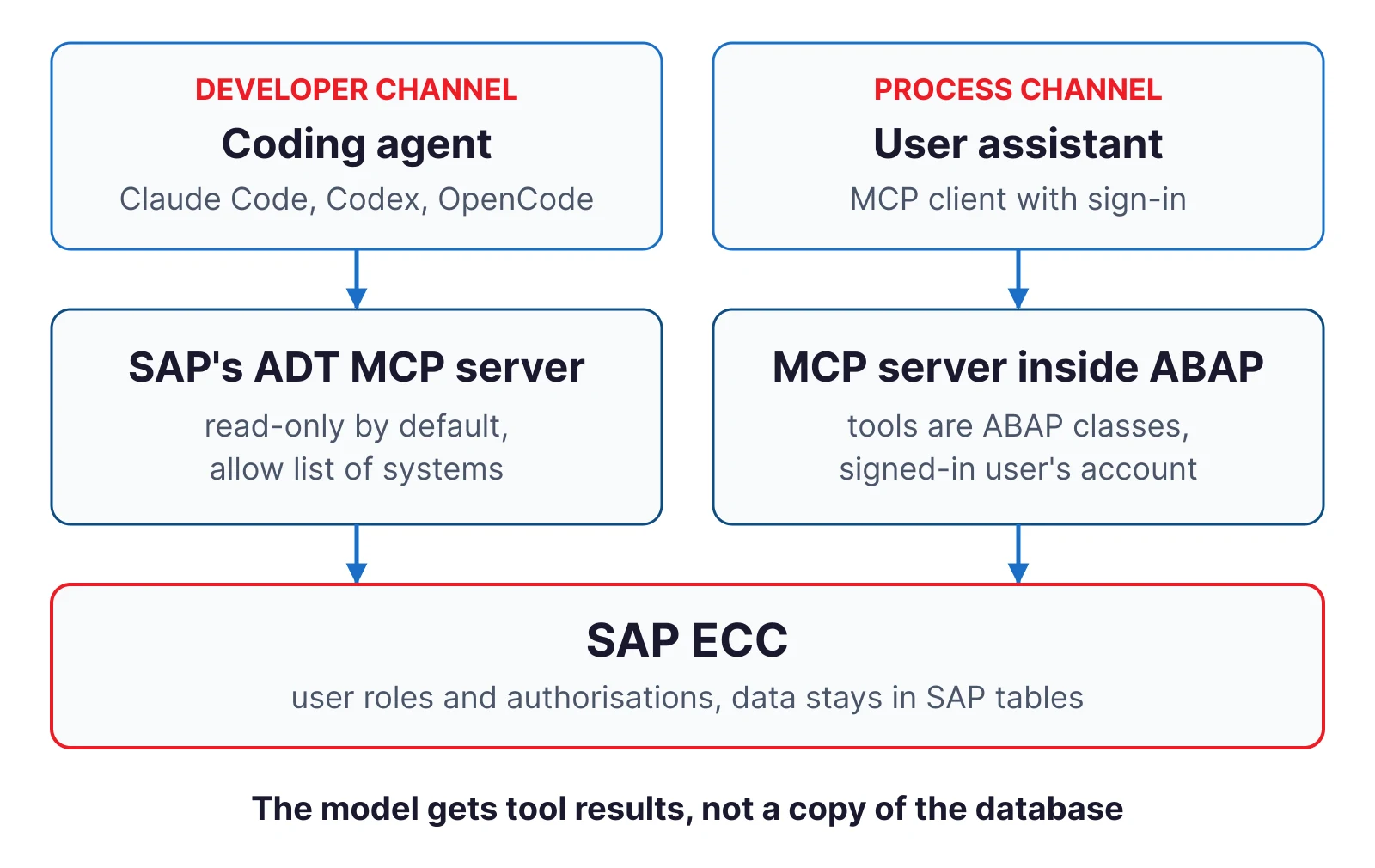
The developer channel: SAP’s ADT MCP server
The ABAP Development Tools team described the update in an SAP Community post on 19 October 2026. The post calls the server the official MCP server for ABAP development from SAP and states that it comes bundled with ADT for Eclipse and ADT for VS Code. According to the post, it supports all ABAP server releases back to SAP NetWeaver 7.31 SP04 and the same connectivity as ADT for Eclipse, RFC and HTTP.
SAP does not mention SAP ECC by name here. SAP ECC 6.0 with enhancement package 6 contains SAP_BASIS 731, the same component release as SAP NetWeaver 7.31, which makes it the oldest ECC release in scope. Whether your system qualifies comes down to the release and support package level of the SAP_BASIS component, so the first step is to check it with your Basis team.
With ADT for VS Code 1.2 the server gained its own tools for reading and editing objects. It no longer depends on the VS Code chat and works with agents run from the command line. SAP names Claude Code, OpenCode, Codex and Copilot among others. The table in the post lists 34 tools; SAP Help lists 36. They cover creating, reading, editing, checking and activating objects, transport requests with a unified diff, ABAP Unit tests, ATC checks and queries against the system’s diagnostic feeds.
The defaults and where they stop
SAP describes the server’s policy as “safety by default”. It consists of four settings: the server is off until someone deliberately switches it on, it works only with systems on an allow list, the edit tool is disabled, and no package is open for writing until the user names one.
Four details in the documentation change the risk assessment:
- The restrictions have a central switch. According to SAP Help it is on by default; once it is turned off, the server does not restrict access at all.
- The package list restricts writing only. SAP Help states that reading is allowed from all packages in an allowed system.
- The VS Code chat edit tools come from Microsoft. The ADT team notes that they have to be managed separately, so disabling editing in SAP’s server does not close that path.
- Diagnostic feeds can carry business data. The feed tool covers short dumps, SAP Gateway error logs and system messages. SAP Help warns that real business and personal data can reach an external model provider this way.
The server uses the same connections as ADT, so the agent works under the developer’s account with the developer’s authorisations, and SAP logs attribute what it does to that developer’s account. Two tasks follow for the organisation: a review of developer roles before the server is enabled, and a separate record of the agent’s session kept by the tool that launches the agent. The server has tools for working with transport requests, including a unified diff; release and import should remain in the existing change management process. We covered how to check code produced this way in our article on securing AI-generated ABAP.
Licensing
According to SAP Help, most of the server’s tools carry no additional cost. Four are marked as chargeable and require an SAP Joule for Developers, ABAP AI capabilities licence: object explanation, the two ATC AI-fix tools and the ABAP documentation search. The same page adds that SAP provides support for the MCP tools only to customers with a valid licence. A coding agent of your choice can therefore work with the standard tools, but without the licence you do so without vendor support. The availability page for AI features in ABAP does not list SAP ECC, so whether an ECC customer can hold such a licence needs SAP’s confirmation before the pilot.
The process channel: an MCP server inside the ABAP stack
The second channel serves business users. One example is an add-on from Skybuffer, presented on the vendor’s product page and in its documentation as an MCP server for SAP ECC and SAP S/4HANA.
According to the vendor, the server is an ABAP add-on that runs in the SAP system and does not require SAP BTP. The tools an AI assistant sees are ABAP classes: developers build, register and transport them like any other object. The central claim is about identity: every call runs as the signed-in user, and the authorisation checks from PFCG roles apply as they do in ordinary work. Sign-in is handled by the SAP system’s standard OAuth 2.0 server, optionally with SAML 2.0 single sign-on.
The assistant therefore works within the authorisations of the person using it. The documentation describes technical users only for the OAuth client and for the node from which the AI client reads discovery documents before the user signs in. A sales representative who cannot see another sales organisation’s orders in a transaction will not see them through the assistant either, provided the tool checks the same authorisation objects as the transaction.
The vendor’s post from December 2025 refers to ABAP releases down to 7.01, while the OAuth configuration guide requires SAP_BASIS 7.40 SP08 or later, so the OAuth path is not documented below that level. The vendor also documents a variant through SAP BTP, called Skybuffer MCP Access, in which users sign in with their corporate account. The product page names Claude, ChatGPT, Gemini, Microsoft Copilot and VS Code as clients, whereas the documentation for the SAP BTP variant states that it has been tested with one client, Claude.
The vendor states that standard SAP authorisation checks are never skipped, and rests that on the tool’s code running in the user’s session. Which authorisation objects are actually checked depends on the tool’s code and the function module it calls. BAPIs do not always perform the same checks as a dialog transaction, so each tool needs an authorisation trace before it is allowed into production.
The SAP API Policy separates the two channels
Section 2.2.2 of SAP API Policy v.4.2026a prohibits API use for integration with autonomous, semi-autonomous or generative AI systems that plan, select or execute sequences of API calls, except through, and within the limits of, SAP-endorsed architectures, data services or pathways expressly identified for that purpose. The accompanying FAQ, version 1.3 of June 2026, states in question 1 that the policy forms part of the documentation for the on-premise portfolio as well.
The developer channel is addressed directly in the FAQ. Question 33 treats ADT APIs as SAP-internal and permits their use through endorsed channels, among them Eclipse ADT, abapGit and SAP-provided developer tools that use those APIs. The same question excludes reading business data and agentic AI workflows operating on business data. Question 37 treats SAP-managed and SAP-published MCP servers as endorsed and gives the CAP, UI5 and Fiori Elements servers as examples. The ADT MCP server is not named in the FAQ, but SAP ships it with ADT, which matches the description of SAP-provided developer tools in question 33. Because the FAQ does not name it, written confirmation from SAP is worth having before a pilot. The boundary is set by the feed tool: if the agent uses it to read business data, it enters the scope question 33 excludes.
The process channel is not addressed in the same way, although the FAQ does not rule it out. Question 23 confirms that interfaces a customer builds in its own namespace are customer-owned code. Question 27 adds that custom code must not create a pathway for agentic AI interactions SAP has not endorsed. Question 56 allows third-party and custom MCP servers provided all use complies with the agreement, the documentation and the policy, including authentication and authorisation on every connection; SAP gives no support or stability guarantees for them. The pathways SAP names in question 35 are the MCP Gateway on SAP Integration Suite, SAP-provided MCP servers via Joule Studio and the A2A protocol. Skybuffer notes on its product page that the Integration Suite MCP gateway can sit in front of its server. SAP’s documents do not settle whether that arrangement makes the pathway SAP-endorsed. These provisions apply to any MCP server in the ABAP stack, including one a customer writes itself.
The FAQ also states, in question 2, that the policy does not change the licence grants in the contract. Whether, and how far, it binds an SAP ECC customer with a perpetual licence depends on how that contract defines the documentation. The wording of the contract settles that, not a tool vendor’s statement. Before piloting the process channel you need a lawyer’s review of the contract and SAP’s position in writing.
Digital Access: document creation is what counts
SAP’s documents on the Digital Access model, from the 2018 pricing paper to the metric description for SAP S/4HANA Cloud or ERP (Private Edition) of October 2026, list nine document types, the sales document among them, and state that only the initial creation of a document is counted. Reading, updating and deleting are not. The same documents treat bots and automated systems as indirect access; the term “AI agent” does not appear in them.
For a project this means read and change scenarios are worth launching before those that create documents. Removing a delivery block is one such change. Creating an order or an invoice is the initial creation of a document, which is what they count. They do not say outright whether that applies to a document created by a licensed named user working through a third-party application under their own account, which is how the process channel works. SAP’s 2018 guide for installed-base customers required a named-user licence under the older model for any access through a third-party application, read-only included. The contract decides what is charged, so an SAP licence review is worth doing before write access goes live.
No replication does not mean the data stays put
Neither channel creates a copy of SAP data in another database. The result of each call still enters the model’s context: a code fragment, the content of a short dump, a list of blocked orders with customer names. With a cloud model that data leaves your infrastructure and falls under your contract with the model provider and under data protection law. With a model running locally it stays on your network.
Choosing the model is therefore a decision about data processing, taken separately for each channel. In the developer channel it turns mainly on what the diagnostic feeds contain; in the process channel, on the data the tools return.
A checklist before the pilot
- What is the SAP_BASIS level in the development and production systems, and does it meet the requirements of the ADT MCP server or the add-on you are considering?
- What authorisations do the developers hold whose accounts the agent will use, and do they include debugging with value changes and releasing transports?
- Does the system you are connecting the agent to contain packages or diagnostic feeds with data the model should not see?
- Where is the agent’s session recorded and who reviews it, given that in SAP logs the agent looks like the user?
- What does your SAP contract say about documentation and indirect access, and do you have SAP’s written position on the process channel?
- Which tools change data in SAP, and does each of them require confirmation by a person?
Where we start a review of an AI channel into SAP
We start with the development system, where the risk is lowest and the developer channel is the one SAP’s documents address directly. We check the SAP_BASIS level, developer roles and the ADT MCP server configuration: the system list, packages open for writing, the edit tools in VS Code and the record of agent sessions. For the process channel we run an authorisation trace on each tool and compare it with the roles of the users who will work with it. The output is a list of settings to change and a list of risks for the system owner, split into technical matters and those that need a lawyer or SAP’s position.
What an agent does in a production system should be visible in the same monitoring as what people do. That is the job of SecurityBridge, which we have been deploying since December 2023; in one deployment, confirmed by the customer’s reference letter, the platform protects five SAP systems, SAP ERP ECC among them. Monitoring attributes events to an account, so an agent’s session appears as activity on the developer’s account. Only a comparison with the session record kept by the tool tells the two apart. Assessing the agent itself, its tools and its resistance to prompt injection belongs to an AI Security review.
If you would like to find out which channel suits your SAP ECC system, get in touch.
Frequently asked questions
Does SAP Joule run on SAP ECC?
SAP’s availability page for AI features in ABAP lists SAP BTP, SAP S/4HANA Cloud Public Edition and SAP S/4HANA Cloud Private Edition. SAP ECC is not on it. For SAP S/4HANA on-premise, SAP makes availability subject to special RISE with SAP contract conditions.
Does SAP’s ADT MCP server work with SAP ECC?
The ADT team states support for ABAP servers back to SAP NetWeaver 7.31 SP04 and does not mention SAP ECC by name. The release and support package level of SAP_BASIS in the system concerned is what decides.
Can an AI agent bypass a user’s authorisations in SAP?
In the developer channel the agent uses the developer’s ADT connection. In the process channel, according to the vendor’s documentation, calls run as the signed-in user. The agent gains no authorisations of its own, but it may see more than the user sees in a transaction: developer roles are often broad, and BAPIs do not always check the same authorisation objects.
Does the SAP API Policy ban AI agents on SAP ECC?
Section 2.2.2 prohibits API use by AI systems that plan sequences of calls outside SAP-endorsed pathways, and the FAQ states that the policy forms part of the documentation for the on-premise portfolio too. Developer channels are addressed separately in it. Whether the policy binds a particular customer is a matter for that customer’s contract.
Is an order change made by an AI assistant counted under Digital Access?
SAP’s Digital Access documents, including the metric description updated in October 2026, count only the initial creation of a document of one of nine types. A change to an existing document is not counted in them. The customer’s contract decides what is charged.
Sources
- ABAP Development Tools team, SAP Community, “ABAP development tools MCP server: Major update available!”, 19 October 2026 - SAP post (accessed 17 November 2026)
- SAP Help, ABAP development tools for Visual Studio Code, “Model Context Protocol Tools” - SAP documentation (accessed 17 November 2026)
- SAP Help, “Enabling ADT MCP Server” - SAP documentation (accessed 17 November 2026)
- SAP Help, Generative AI in ABAP Cloud, “Availability” - SAP documentation (accessed 17 November 2026)
- SAP Community, “SAP Joule for Developers, ABAP AI capabilities”, 12 June 2026 - SAP post (accessed 17 November 2026)
- SAP, “SAP API Policy”, v.4.2026a - SAP document (PDF) (accessed 17 November 2026)
- SAP, “API Policy - FAQ”, version 1.3, June 2026 - SAP document (PDF) (accessed 17 November 2026)
- SAP, “SAP ERP Pricing for the Digital Age”, April 2018 - SAP document (PDF) (accessed 17 November 2026)
- SAP, “Indirect Access Guide for SAP Installed Base Customers”, April 2018 - SAP document (PDF) (accessed 17 November 2026)
- SAP, “SAP Digital Access in SAP S/4HANA Cloud or ERP (Private Edition)”, version 1.2, October 2026 - SAP document (PDF) (accessed 17 November 2026)
- SAP, “Digital Access Adoption Program”, April 2020 - SAP document (PDF) (accessed 17 November 2026)
- Skybuffer, “MCP server for SAP ECC and S/4HANA” - vendor page (accessed 17 November 2026)
- Skybuffer, documentation, “OAuth configuration for SAP MCP server” - vendor documentation (accessed 17 November 2026)
- Skybuffer, documentation, “MCP Access installation” - vendor documentation (accessed 17 November 2026)
- Skybuffer, documentation, “MCP tools creation” - vendor documentation (accessed 17 November 2026)
- Skybuffer, SAP Community, “MCP Server for SAP ECC & S/4HANA”, 18 December 2025 - vendor post (accessed 17 November 2026)