

Today, data management is one of the biggest challenges facing companies that use SAP solutions. Data volumes are growing at an alarming rate, which makes it necessary to look for modern solutions that help keep systems in good health. One such solution is the use of SAP IQ Near-Line Storage (NLS) with Azure Premium Files. How exactly should such a deployment be carried out, and why is it worth doing?
What is SAP IQ Near-Line Storage (NLS)?
SAP IQ NLS is a solution that allows large volumes of data that are not actively used, but must remain accessible, to be stored. Imagine that SAP HANA is a crowded city, and SAP IQ is a warehouse on the outskirts, where you can store things that are not needed on a daily basis but can be delivered quickly whenever they are required. Moving older data to SAP IQ relieves SAP HANA, allowing the system to run faster and more efficiently.
Why choose Azure Premium Files?
Azure Premium Files is a cloud service ideally suited to storing SAP IQ data. It offers:
-
High performance: you can count on fast data access and low latency, which is crucial when large volumes of information need to be processed quickly.
-
Scalability: you can easily increase or decrease disk space depending on the company’s needs, helping to avoid unnecessary expenditure.
-
Security: Azure Premium Files provides the highest level of data protection, which is essential in the context of regulatory compliance.
Context and the need for implementation
Many clients use SAP IQ to store historical data, thereby relieving their SAP BW systems. This allows those systems to run more efficiently, and reduces the costs associated with maintaining the infrastructure. However, it is essential to design and implement the SAP IQ architecture in such a way that data remains available online in line with business process requirements. In response to these needs, working together with partners and clients, an SAP IQ-NLS architecture on the Azure platform was developed, using Azure Premium Files. The aim of this solution is to achieve a recovery point objective (RPO) of zero within a Zonal Disaster Recovery (Zonal DR) setup.
Architecture and solution components
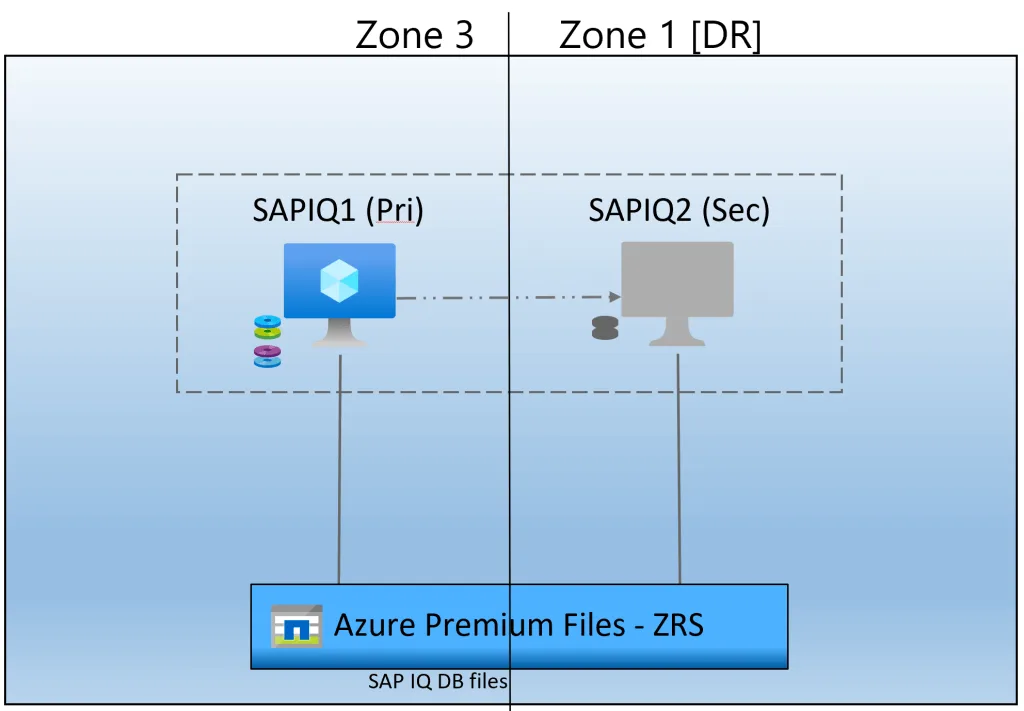
The proposed solution involves deploying two virtual machines (VMs) in different zones within the Azure East US region. The first will act as the Primary VM, hosting the SAP IQ binaries, while the second, located in a different zone, will act as a Secondary VM, using Azure Site Recovery to manage DR.
Main architecture components:
-
Virtual machines: two virtual machines (VMs) distributed across different zones in the Azure East US region. The Primary machine hosts the SAP IQ binaries, and the Secondary machine is configured to manage DR using Azure Site Recovery.
-
Azure Premium Files: the database files are hosted on Azure Premium Files with Zonal Redundant Storage (ZRS) enabled to ensure data redundancy between zones.
-
Azure Site Recovery (ASR): a tool for orchestrating the failover process to the Secondary machine in the event of a zone outage. ASR enables a seamless switch to the standby machine and meets the requirements associated with Disaster Recovery.
-
Backup strategy: an additional Azure-managed disk is attached to the Primary machine, on which backups are performed regularly. Rubrik is used to manage the backups.
Implementation steps
Creating the virtual machines:
-
Two virtual machines should be created in the Azure East US region, placed in different zones.
-
Network and security settings should be configured to ensure optimal performance and data protection.
Configuring Azure Premium Files:
-
Create an Azure Premium Files account with Zonal Redundant Storage (ZRS) enabled.
-
Make sure the SAP IQ database files are hosted on Azure Premium Files with ZRS.
Installing SAP IQ:
-
Install the SAP IQ software on the Primary machine.
-
Configure the SAP IQ database files to be hosted on Azure Premium Files.
Configuring Azure Site Recovery:
-
Configure Azure Site Recovery to manage DR between the Primary and Secondary machines.
-
Create a recovery plan that automates the failover process in the event of a zone outage.
Managing backups:
-
Attach an additional Azure-managed disk to the Primary machine and configure regular backups.
-
Use Rubrik to manage the backups.
How can SNOK help?
At SNOK we have many years of experience implementing advanced SAP solutions, such as SAP IQ Near-Line Storage on the Azure platform. Our team of experts is ready to help your company implement this solution, tailoring it to your specific business requirements. With our support, your organisation gains not only a stable and secure infrastructure, but also the confidence that all data is protected and available in every situation.
Summary
Deploying an SAP IQ database on Azure Premium Files with Zonal Redundant Storage (ZRS) provides data redundancy between zones, achieving a recovery point objective (RPO) of zero. The virtual machine running the SAP IQ software is replicated to a standby zone using Azure Site Recovery. This solution ensures high availability of the database files and the ability to fail over to the standby machine in the event of a zone outage. This architecture is well suited to client needs, offering a robust infrastructure for running critical SAP IQ workloads on the Azure platform.
A well-designed and thoroughly tested SAP IQ-NLS deployment on Azure Premium Files is a step towards data stability and security within your company. Every organisation should tailor these guidelines to its own specific business needs in order to minimise the technical and business risks associated with implementation.