

The best recommendation one of our clients heard at a workshop last year was: “don’t automate this.” Not “it can be done,” not “let us count the licences,” not “we’ll deliver it in six weeks.” Simply: it’s not worth it, not yet.
That sounds like shooting yourself in the foot. A consulting firm that lives off automation telling a client not to automate. And yet it was exactly this conversation that built more trust than ten slides about savings - because the client heard something the market never tells them.
The market says one thing: automate everything. Now there is a second layer on top - bring in AI agents, let them do the work for you. The pressure is real and the temptation even greater, because the tools keep getting better and easier to use. The problem is that how easy it is to launch an automation has nothing to do with whether a given process should be automated at all.
In this Tech Thursday we go against the grain. Instead of yet another list of processes worth robotising, we show four signs that a process will kill your project - and give you a simple test that catches them before you spend a single euro.
Automation is not always savings. Sometimes it is an accelerated expense
Let’s start with a number that should give pause to anyone planning an automation programme. Based on EY’s own observations, described in the “Get ready for robots” report, as many as 30 to 50 percent of initial RPA projects fail (data from around 2016 - treat it as a precedent from years back, not as today’s market, though the failure mechanism is still current). This is not a margin of error. It is a coin toss.
The second number is even more telling. In its global RPA survey, Deloitte found that at the time only 3 percent of organisations managed to scale their digital workforce to fifty or more robots (survey from 2017, published in 2018 - the market has matured since, but the gap between pilot and scale stayed the same). The rest got stuck on pilots and single bots. The pilot works, the demo impresses, and then the project goes quiet - because it turns out that maintaining what was built costs more than anyone assumed.
Why does this happen? Not because the technology is bad. UiPath, which we work with as a Platinum partner, is a mature, powerful platform. The problem almost never lies in the tool. It lies in process selection. Automation is like a lever - it amplifies whatever you put under it. Put a good, stable process under it and you get real savings. Put a chaotic, changing, exception-riddled process under it and you get the same chaos, only faster and more expensive to maintain.
These four signs are the filter we apply at SNOK before we tell a client “yes.” It is worth applying them yourself.
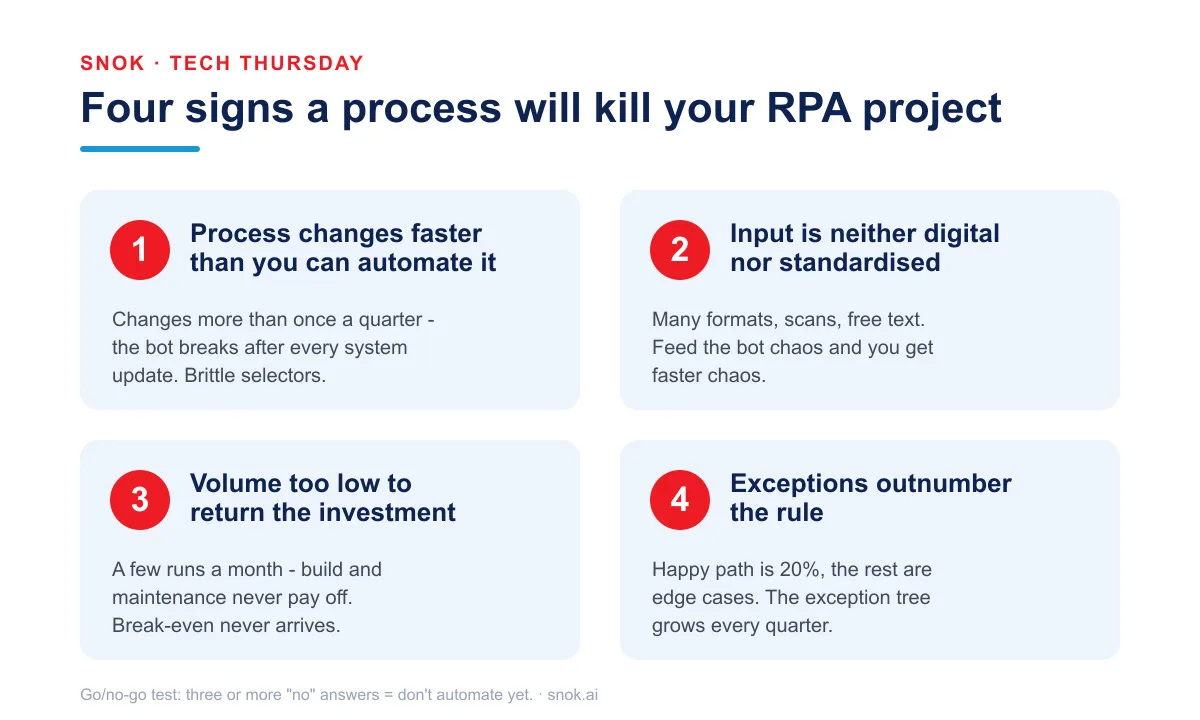
Sign 1 - The process changes faster than you can automate it
A software robot mimics a person clicking through applications. It sees fields, buttons, tables - and reproduces the same sequence hundreds of times. As long as the screen looks the same, the bot works flawlessly. The trouble starts the moment the screen changes.
And the screen changes more often than you think. A vendor updates the application interface. Finance adds a new field to a form. A regulatory change forces a rebuild of part of the process. Each such change can break a bot that worked perfectly the day before. The phenomenon even has a name in the industry - brittle selectors. The bot clings to a specific spot on the screen or a specific field structure, and when that shifts, the automation stops understanding what it sees.
If the process you want to automate undergoes a significant change more often than once a quarter - a threshold that, in our experience, works well as a line of caution - you are building something you will spend more time fixing than using. Automation stabilises what is stable. It does not chase a moving target. Before you start, ask yourself honestly: will this process look the same a year from now? If you cannot answer “yes” with a clear conscience, you have your first warning sign.
That does not mean the process is lost forever. It only means that until it stabilises, automation will be a bottomless pit.
Sign 2 - The input is neither standardised nor digital
Automation feeds on predictability. A bot handles input that looks the same every time best: a structured file, a form with the same fields, data from a system in a fixed format. Then it can process a thousand records without a single error.
The reality in many companies looks different. Data arrives from five sources, in five formats. Some in email, some in scans, some in a spreadsheet each department fills in its own way. Add free text, typos, missing fields, and “well, you know what I mean.” For a human this is everyday work handled intuitively. For a bot it is a minefield.
When you feed automation input like this, you get one of two outcomes. Either the bot trips on every unusual case and buries you in error reports, or - worse - it processes bad data without blinking and spreads the mistake across the entire system at machine speed. Because automation does not fix data quality. It multiplies it.
So before you automate a process, check whether the input is digital and standardised. If it is not, that is where the real work lies. Cleaning up source data usually delivers a bigger return than the automation itself and is a precondition for automation to make any sense at all. Automating a mess is still a mess.
Sign 3 - The volume is too low to return the investment
This is the simplest sign mathematically, and yet the one most often ignored - because automation is fashionable and people want it regardless of the arithmetic.
Every automation has two costs: build and maintenance. The build is a one-off effort of analysis, design and deployment. Maintenance is a cost that returns every month for as long as the bot lives - because, as we noted with the first sign, systems change and automation needs tuning. On the other side of the equation sits the saving: the time of the people whose work is lifted.
If you run a process a few times a month and each run takes someone fifteen minutes, the saving is symbolic. Break-even, the point at which the automation starts to pay off, will never come - or will come so far out that the process will change before then anyway. Automation makes sense where repetition and volume create real leverage: a process run dozens or hundreds of times a day, consuming hours of the team’s work.
Before you start building, do the maths. How many times a month does the process run? How long does it take manually? What does it realistically cost to build and to maintain for a year? If those numbers do not add up to a sensible return within a reasonable horizon, the automation is a vanity project. Better to direct the same money and attention to a process that will genuinely carry the lever.
Sign 4 - Exceptions outnumber the rule
Imagine a process where the happy path - the standard run without complications - covers twenty percent of cases. The other eighty percent are unusual situations: “this client has a different contract,” “here we need to ask legal,” “it depends on what the manager says.” Each of these requires judgement, a decision, context.
Such a process can be automated - technically almost anything can. But every exception is a separate branch of logic that has to be designed, built, tested and then maintained. When exceptions outnumber the rule, you are mostly automating exceptions. And that is the most expensive and most brittle kind of automation there is - a decision tree that swells every quarter and that nobody fully understands after a year.
The fourth sign is often a sign that the process is simply too complicated - not for the bot, but in general. Before you robotise it, it is worth asking whether it could be simplified first. Reduce the number of exceptions, unify the rules, cut the edge cases that stem from habit rather than real need. A simplified process often turns out to be an excellent automation candidate. The same process in its original, branching form - a maintenance nightmare.
How these signs look in practice
The theory sounds clean, but it is easiest to see through patterns that repeat across clients regardless of industry. Below are four typical situations - deliberately without names or specific numbers, because the point is the mechanism, not a single case.
The first sign most often shows up in processes built on a third-party vendor’s web application that regularly changes its interface. The bot works great for a few weeks, then a portal update arrives and the sequence no longer matches. The team spends more time patching the automation after each of the vendor’s releases than it saved on the process itself. The solution is often not a better bot but integration via API instead of clicking through the screen - assuming the vendor offers one.
The second sign classically surfaces in handling incoming documents from many parties - invoices, orders, forms - in a dozen different layouts, often as scans of varying quality. The temptation to “throw a bot with OCR at it” is strong. But until the input is at least partly unified or backed by a document-recognition layer with validation, the automation generates more exceptions for manual handling than cases it resolves on its own.
The third sign is processes run rarely - for example once a month at period close - that look like ideal candidates at first glance because they are tedious. Only the arithmetic reveals that at this frequency the build and maintenance cost would pay back after years, and the process will probably change sooner. Honest calculation matters more here than the enthusiasm of a team that is tired of clicking.
The fourth sign is visible everywhere every case is “a little different” - complaint handling, unusual HR cases, individually negotiated terms. The exception tree grows faster than the savings, and after a year nobody on the team can say what the automation does in each branch. That is the moment to step back and ask whether the process needs organisational simplification first.
The common denominator of these four patterns is one: the problem never lay in the tool. It lay in the process not being ready.
A simple go/no-go test before you spend a single euro
The four signs boil down easily to five questions you can ask about any process before you even talk to a vendor. This is our go/no-go test:
- Stability. Will the process be in the same form twelve months from now?
- Data. Is the input digital and structured?
- Return. Does the volume deliver a real return within a reasonable horizon?
- Exceptions. Does the standard path cover most cases?
- Process quality. Is the process itself sensible, or are we just cementing a bad habit?
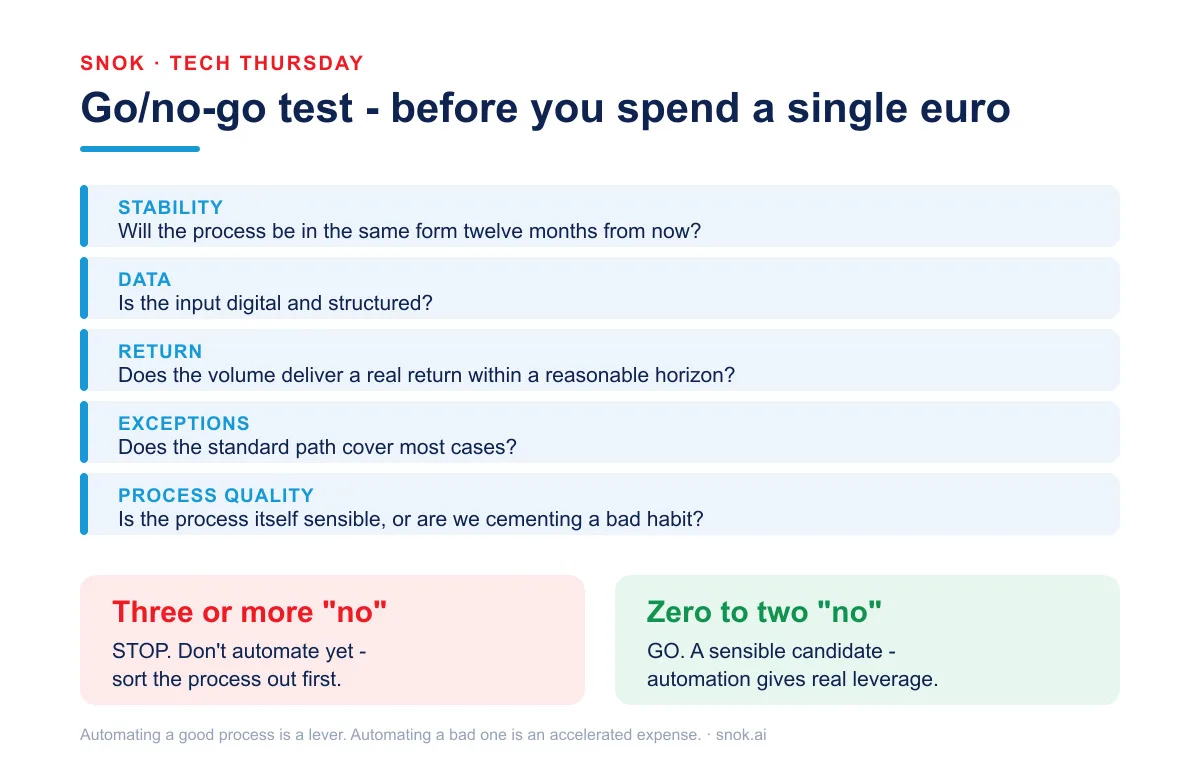
The rule is simple. If you answer “no” to three or more questions, this is not an automation candidate. Not yet, at least. Sort the process out first, then come back to it. That is not a failure - it is money and nerves saved.
This test is deliberately simple. It will not replace a proper feasibility analysis, which is worth doing anyway for a serious investment. But it catches the most common mistakes at a stage where the correction costs a conversation, not a burned budget.
Automating a broken process is a broken process, only faster
Beneath all of this lies one principle worth remembering above the specific signs. Automation fixes nothing. It cements and accelerates what is already there.
Michael Hammer wrote about this in the Harvard Business Review back in 1990, in his famous article “Reengineering Work: Don’t Automate, Obliterate.” His line became a classic: it is time to stop paving the cow paths. Instead of embedding outdated processes in software, we should rethink them from scratch. Thirty-six years later the line is painfully current, because the temptation is the same - it is easier to automate what exists than to ask whether it should exist in that form at all.
Order matters. First simplify and stabilise the process, then automate it. The reverse order - bot first, tidying up sometime later - is one of the most common reasons RPA projects fail to deliver the promised return. Because then you are automating not the process, but its chaos.
Agentic AI does not remove these questions. It raises the stakes
This is where a counterargument we hear more and more often comes in: surely AI agents change the rules of the game. An agent handles variability better than a rigid rule-based bot, can interpret unstructured input, can deal with an exception nobody anticipated. Doesn’t that cancel the four signs?
Partly, yes. An agent built on a language model does absorb variance better than a selector glued to a specific field. That is real progress, and we build such solutions ourselves within our intelligent automation practice on UiPath’s Agentic Automation track. But it would be a mistake to conclude that the agent removes the problem. It moves it to a higher level - and raises the stakes.
An agent on an unstable, chaotic process is at once a source of non-deterministic errors (because the model does not always answer the same way) and a new attack surface. The permissions the agent holds, prompt injection, the lack of a clear audit trail for decisions, costs that climb with every model call - all of this means that a bad process handled by an agent is not a cheaper problem but a more expensive one, and harder to control. We covered this new attack surface separately, because it is a topic for a whole article.
The market is already testing this. Gartner forecasts that over 40 percent of agentic AI projects will be cancelled by the end of 2027 - due to rising costs, unclear business value and insufficient risk controls (Gartner press release, June 2025). These are exactly the same reasons that killed RPA projects a decade earlier. The technology changed; the questions stayed the same.
Our stance: saying “no” is part of the job
At SNOK we treat process selection as the first and most important stage of every automation project. Before we propose an architecture, licences or a timeline, we run this filter together with the client. Sometimes it ends with a recommendation to hold off on automation and tidy up the process first. We know this is not what a vendor is “supposed” to say. But it is what an honest advisor has to say.
As Michał Korzeń, CTO of SNOK, puts it:
“The most expensive bot is not the one we didn’t build. It’s the one that works but has to be fixed after every system update. That’s why, before we automate anything, we ask the client not whether it can be done, but whether the process is ready. Usually it needs tidying up first.”
This is not caution for caution’s sake. It is arithmetic. A project that starts on a well-chosen process delivers a return and grows. A project that starts on a bad process eats the budget, frustrates the team, and ends up in the statistic of those 30 to 50 percent that did not deliver.
Three moves before you come back to automation
A process that failed the test does not go in the bin. It goes into the queue - with a concrete list of things to do that usually bring value regardless of whether a bot appears at the end.
The first move is simplification. If the process failed on the fourth sign, look at the exceptions. How many stem from a real need and how many from habit, a historical decision, or “we’ve always done it this way”? Cutting even half of the edge cases can turn an un-automatable process into an obvious candidate. This is organisational work, not technical, and often the hardest - because it takes a decision, not code.
The second move is stabilising the input. If the process failed on the second sign, ask where the data originates and whether it can be tidied up at source. One standardised form instead of five variants, integration instead of manual re-keying, validation on entry instead of corrections at the end. This is an investment that pays off even without automation, and only then makes automation a real option.
The third move is measurement. If the process failed on the third sign, gather hard data before you decide: real frequency, execution time, number of people involved. Very often it turns out that a process that “seemed” tedious does not, in numbers, justify the investment - or that the real cost lies somewhere entirely different from where you meant to put the bot.
Only after these moves is it worth returning to the go/no-go test. Usually a process that earlier collected three “no” answers passes easily once tidied up - and then automation does exactly what it promises.
What to do about it in practice
If you are planning automation - RPA, AI agents, anything in between - start by changing the question. Do not ask “can this be automated,” because the answer is almost always “yes.” Ask “should we automate this now,” and then run the process through the five questions of the go/no-go test.
Three “no” answers are not a verdict. They are information that there is other work to do first - and that it is worth doing before you put a bot or an agent on the process. Automating a good process is a lever. Automating a bad one is an accelerated expense.
If you would like to run your process through this filter with someone who will tell you “no” when needed, let’s talk. Sometimes the best recommendation you will hear from us is “don’t automate this yet.” And that is value too.
Tech Thursday by SNOK - a weekly dose of practical knowledge about automation, SAP and cybersecurity. Read more about our approach in From idea to an agent in production, An AI agent on both sides of the attack and SAP automation - the key to IT efficiency.
Sources
- EY, “Get ready for robots: Why planning makes the difference between success and disappointment” (~2016) - as many as 30-50% of initial RPA projects fail to meet goals. https://eyfs.ie/wp-content/uploads/2016/11/ey-get-ready-for-robots.pdf
- Deloitte, “The robots are ready. Are you? Global RPA Survey” (survey 2017, published 2018) - only 3% of organisations scaled to 50+ robots. https://www2.deloitte.com/be/en/pages/strategy-operations/core-business-operations/articles/therobotsarereadyareyou.html
- Gartner, press release 25 June 2025 - over 40% of agentic AI projects will be cancelled by the end of 2027. https://www.gartner.com/en/newsroom/press-releases/2025-06-25-gartner-predicts-over-40-percent-of-agentic-ai-projects-will-be-canceled-by-end-of-2027
- Michael Hammer, “Reengineering Work: Don’t Automate, Obliterate”, Harvard Business Review, July-August 1990.