# From River Raid to a model on your desk: choosing a Mac and Lenovo ThinkStation PGX for local AI
> Which Mac for local AI: memory, bandwidth, quantisation, Mac Studio prices at 256 and 512 GB, and a MacBook Pro versus PGX test. See the cheat sheet.
- Source: https://snok.ai/en/news/blog/local-ai-models-mac-lenovo-pgx-guide/
- Author: Jacek Bugajski
- Published: 2026-11-09
---
## Key takeaways
- Unified memory capacity decides whether a local model runs at all; memory bandwidth decides how fast it writes. The chip's name comes a distant third.
- A model's footprint is its parameter count times the precision of each weight: Qwen3.8-27B needs about 56 GB in BF16 and about 16 GB once quantised to 4 bits, plus memory for the context.
- On 7 November 2026 Apple's Polish store priced the Mac Studio with a 1 TB SSD at PLN 26,999 with M5 Max and 128 GB, PLN 47,999 with M5 Ultra and 256 GB and PLN 111,999 with 512 GB; a Lenovo ThinkStation PGX has 128 GB at 273 GB/s.
- On a short answer, qwen3-coder 30B generated about 71 tokens per second on a MacBook Pro with M4 Max and about 78 on a Lenovo ThinkStation PGX, and the PGX lead grew on a long answer - for this MoE model, compute and software mattered most.
- At SNOK the MacBook is for testing models, while two Lenovo ThinkStation PGX units run continuous workloads: coding, tender analysis and AI agent security testing. Client data under NDA stays in the client's environment.
When an Atari 800 XL arrived in our home, I spent hour after hour flying up the river in River Raid. The game had one more virtue that anyone who owned an Atari with a cassette deck will appreciate: it loaded quickly. Most programs took long minutes to load, screeching through the TV speaker, and a single read error sent you back to the start. If you ever adjusted the tape head with a screwdriver, you know exactly what I mean.
The short loading time came down to size. Carol Shaw wrote River Raid for Activision in 1982 for the Atari 2600 console and fitted the whole game into 4 KB. For the Atari home computers, released in September 1983, she rewrote much of it and kept it to 8 KB. In the original, the river was never stored in memory: a pseudo-random generator drew it on the fly, because a map would not have fitted.
For this piece I gave a language model running locally, with no internet connection, the specification for a game in the spirit of those shooters. I called it "Rzeka Wspomnień", River of Memories: a jet flies upriver, shoots boats and helicopters, refuels and destroys bridges. I ran it on two machines - my MacBook Pro and the Lenovo ThinkStation PGX that runs SNOK's continuous AI workloads. The model that wrote the code weighs 18 GB, more than two million times the size of River Raid on the Atari.
Games that were once written in assembly, counting every byte, can now be sketched by a local model in minutes, although, as the test showed, a finished game still takes a design and code reviews from a stronger model. The more interesting question is which computer to buy to run such models in-house, and whether a Mac is enough or a GPU server is needed. What follows is my answer, built on manufacturers' specifications, Apple's Polish store and lenovo.com prices, our own measurements and the way we use local models at SNOK.
## Memory first, bandwidth second, chip name last
The prompt for this column was "Best Local LLMs for Mac in 2026", published on 28 October in Python in Plain English on Medium by an author writing as Code&future. The author admits to having the Apple configurator open as soon as M6 was announced, before reading the spec sheet. Only later came the realisation that the M6 Mac mini maxes out at 32 GB of memory, while the same machine with the older M5 Pro takes 64 GB.
That is the single most important lesson when buying hardware for local models. The whole model has to fit in memory, and on Apple silicon the CPU and GPU share one unified memory pool. If the model does not fit, it either refuses to load or pages in from disk so slowly that it becomes useless. If it does fit, speed is governed by memory bandwidth, because every generated token requires the chip to read the model's weights.
That gives a simple rule of thumb I use before any hardware conversation: memory bandwidth divided by model size gives a theoretical ceiling in tokens per second. The dense Qwen3.8-27B model takes about 15.6 GB at 4-bit quantisation. On a chip with 614 GB/s of bandwidth the ceiling is about 39 tokens per second; at 153 GB/s it is just under 10.
One detail in the article needs updating. The author says the Mac mini is the only M6 machine. On 27 October, the day before publication, Apple also announced an iMac and a 14-inch MacBook Pro with M6. The conclusion stands: in all three, M6 tops out at 32 GB.
## Why a model can take 5 GB or 470 GB
A model's memory footprint depends on three things: how many parameters it has, how precisely each one is stored, and how much context it needs to hold.
**Parameters.** A model is billions of numbers - weights - fixed during training. Qwen3.5-9B has 9.65 billion parameters, Qwen3.8-27B has 27.8 billion and Qwen3-235B-A22B has 235 billion. The smaller members of a family are separate networks, often trained with help from the larger ones (distillation). They know less and cope less well with multi-step reasoning, but write faster and fit in a laptop.
**Precision and quantisation.** Weights are usually published in BF16, two bytes per parameter. Qwen3.8-27B then takes about 56 GB and Qwen3-235B-A22B about 470 GB. Quantisation rounds the weights to fewer bits. At 8 bits the 27B model needs about 30 GB; at 4 bits, with format overhead bringing it to roughly 4.5 bits per parameter, about 16 GB. That is why the same model appears in several sizes on Hugging Face and in the Ollama library, and why labels such as Q8_0, Q4_K_M, FP8, MXFP4 or "MLX 4-bit" all describe precision.
The smaller size comes at a cost in quality. Our working rule: 8 bits is hard to tell apart from the original, 4 bits is a sensible compromise for most uses, and below 4 bits the model makes more mistakes in code, figures and longer chains of reasoning. I did not measure quality in this test. In our lab we ran Qwen3-235B-A22B at 3 bits, where it took about 104 GB and fitted on a single PGX.
**Mixture-of-experts models.** An MoE model is built from many specialised blocks and activates only some of them for each token. Qwen3.6-35B-A3B has 36 billion parameters but activates around 3 billion - the "A3B" in its name. The whole model must sit in memory, yet each token reads only the active part, so it writes at the speed of a small model. For machines with 24-32 GB this is currently the best trade-off.
**Context.** A loaded model takes more memory than its file. For the whole input it keeps intermediate results, the so-called KV cache, which grows with context length. The qwen3-coder 30B model has an 18 GB file, yet in Ollama it occupied 22 GB on the PGX with a 65,536-token context and 33 GB on my MacBook with 262,144 tokens. Analysing long documents therefore needs headroom beyond the model itself.
**Two phases of inference.** Inference - the model working on an answer - happens in two phases. First it reads the prompt and documents, processing many tokens in parallel; here compute matters. In my test the Mac read 4,282 tokens of its own code in just over three seconds, roughly 1,300 tokens per second. Then it writes the answer one token at a time, reading the weights for each; here bandwidth rules. The same Mac wrote at 48.8 tokens per second. If you mostly analyse long documents, look at compute as well; if you mostly generate text or code, bandwidth comes first.
## Four classes of M-series chip, side by side
Apple currently offers Macs with chips in four classes. Core counts differ, but for local models two numbers matter most: how much memory you can buy and how quickly the chip reads it.
| Chip | Max memory | Bandwidth | Ceiling for a 27B model (4-bit) |
|---|---|---|---|
| Apple M5 | 32 GB | 153 GB/s | approx. 10 tok/s |
| Apple M6 | 32 GB | 170 GB/s | approx. 11 tok/s |
| Apple M5 Pro | 64 GB | 307 GB/s | approx. 20 tok/s |
| Apple M5 Max | 128 GB | 614 GB/s | approx. 39 tok/s |
| Apple M5 Ultra | 512 GB | 1.2 TB/s | approx. 77 tok/s |
| NVIDIA GB10 (Lenovo PGX) | 128 GB | 273 GB/s | approx. 18 tok/s |
The same amount of data, pipes of different widths: M5 Ultra reads memory almost eight times faster than the base M5
The M5 Max with a 32-core GPU has 460 GB/s; the table shows the 40-core version. Bandwidth figures come from Apple's specifications; the token ceilings are my own calculation.
The ceiling is a physical limit. In our lab a dense 70B model on GB10 managed about 3 tokens per second against a ceiling of 6.9, or 43 per cent. For mixture-of-experts models the formula has to use the size of the active part, and the resulting ceiling is so high that something else sets the pace, as the test below shows. The formula is for comparing machines with each other.
## Which Mac for which job, from 16 GB to 512 GB
**16 GB: a personal assistant.** A Mac mini with M6 and 16 GB of memory (PLN 6,999 with a 1 TB SSD). Models of 7-9B fit comfortably, for example Qwen3.5-9B at about 5.4 GB in 4 bits. Good enough for summarising documents, polishing text and simple scripts. Remember that macOS and the browser need their share of memory too.
**24-32 GB: the first serious tier.** A Mac mini with M6 and 24 or 32 GB (PLN 7,999 or 8,999), or the 14-inch MacBook Pro with M6 and the same memory (PLN 11,499 or 12,499). Qwen3.8-27B fits comfortably in 24 GB; with 32 GB, Qwen3.6-35B-A3B and Gemma 4 31B fit too. At 170 GB/s, though, the ceiling for a dense 27B model is about 11 tokens per second, and less in practice, so I would pick MoE models.
**64 GB: the first machine for a team.** A Mac mini with M5 Pro and 64 GB (PLN 14,999) or a 14-inch MacBook Pro with M5 Pro and 64 GB (PLN 18,999). A 70B-class model at 4 bits takes about 39 GB, so it technically fits, but at 307 GB/s the ceiling is under 8 tokens per second. This memory is better spent on a 27B model running more than twice as fast, with a second model alongside, for example for document search.
**128 GB: the everyday workhorse.** A Mac Studio with M5 Max and 128 GB (PLN 26,999) or a 14-inch MacBook Pro with M5 Max and 128 GB (PLN 34,499; with this chip Apple only sells the MacBook Pro with at least a 2 TB SSD). This is the class of machine I test models on. MoE models up to roughly 120 billion parameters fit here, including gpt-oss-120b, which took about 63 GB in our lab. That is the same capacity as a Lenovo ThinkStation PGX, but with the 40-core GPU at 614 GB/s rather than 273 GB/s.
**256-512 GB: a lab in a single box.** A Mac Studio with M5 Ultra and 256 GB of memory costs PLN 47,999. Apple sells the 512 GB option only with the higher-binned chip (36-core CPU, 80-core GPU), and with a 1 TB SSD that configuration costs PLN 111,999. With 256 GB you can run 235B models. A 405B model takes about 228 GB at 4 bits, so you need 512 GB to run it with sensible headroom. In September I explained why I considered such a machine as a proof-of-concept station for SNOK, in [Mac Studio 512 GB versus DGX Spark](https://snok.ai/en/news/blog/mac-studio-512gb-vs-dgx-spark-poc-machine/).
Prices come from the apple.com/pl configurator on 7 November 2026, each for the stated memory with a 1 TB SSD, except the MacBook Pro with M5 Max. On the same chip variant (36/80), going from 256 GB (PLN 54,499) to 512 GB adds PLN 57,500, more than two base M5 Ultra machines with 96 GB (PLN 27,999 each).
## One, two and four Lenovo ThinkStation PGX units
The [Lenovo ThinkStation PGX](https://snok.ai/en/lenovo-snok/) is a workstation built on the NVIDIA GB10 superchip, with 128 GB of unified memory at 273 GB/s and NVIDIA's full software stack, the same one that runs NVIDIA servers in data centres. We [put it through its paces in our lab](https://snok.ai/en/news/blog/lenovo-thinkstation-pgx-gb10-hands-on/) in August, and SNOK now runs two of them. Lenovo's Polish store lists no public price for the PGX. In November 2026 it sells in Poland for about PLN 28,000 including VAT, roughly the price of a Mac Studio with M5 Max and 128 GB.
One PGX matches the capacity of a MacBook Pro with M5 Max at less than half the bandwidth. Its strengths lie elsewhere: CUDA, vLLM and SGLang, fine-tuning, and serving many users at once. What you build on a PGX moves to a data-centre server without rewriting the serving layer.
Two PGX units linked through their built-in ConnectX-7 cards (200 Gb/s) give 256 GB. According to NVIDIA, such a pair handles models of up to 405 billion parameters.
Four units give 512 GB and, according to NVIDIA, models of up to 700 billion parameters. The NVIDIA Sync documentation, updated on 30 October, states plainly that four units need a network switch; an eight-unit configuration has been announced without a date.
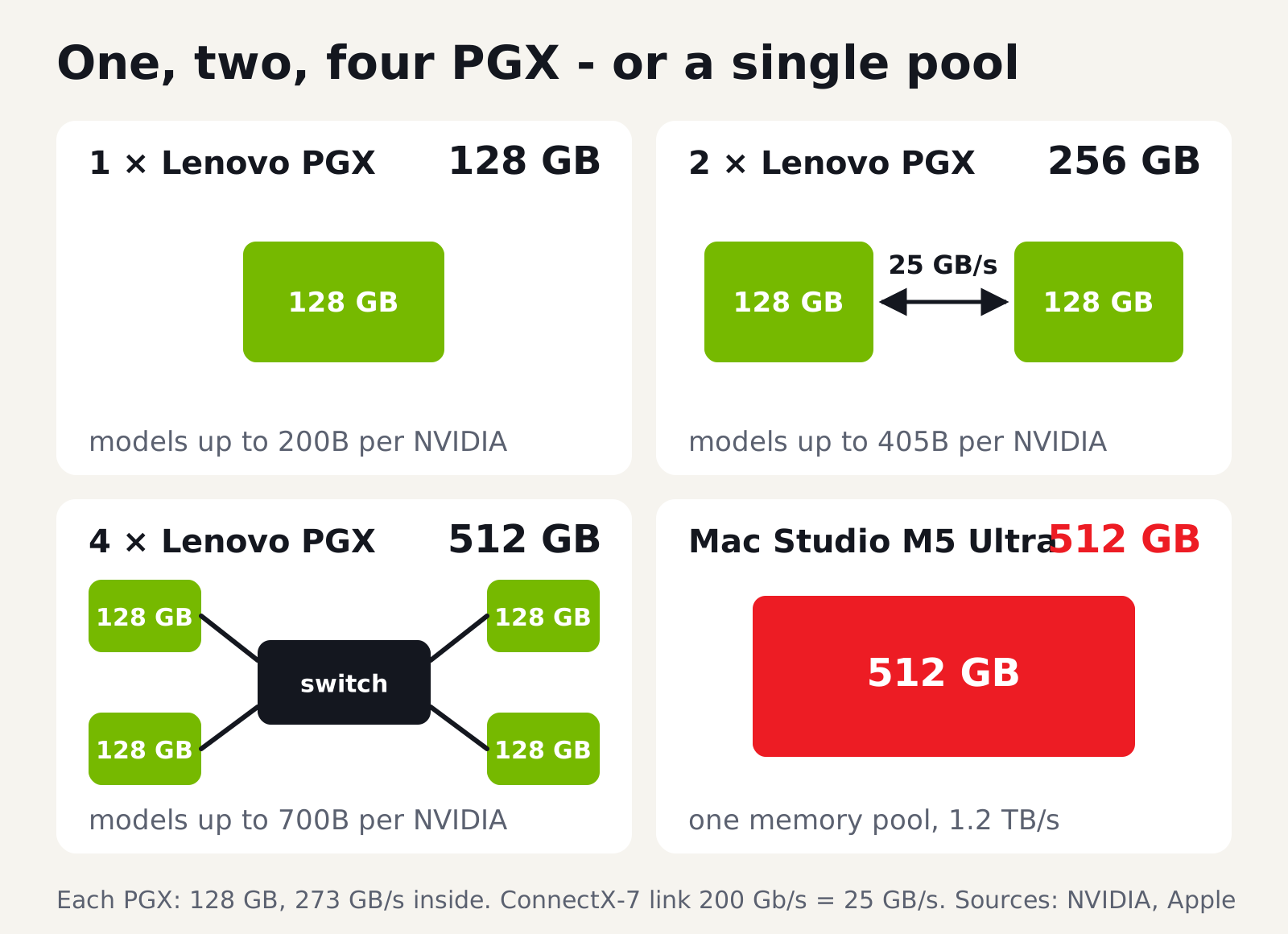
The 200 Gb/s link is 25 GB/s, about eleven times less than the memory bandwidth inside a single PGX. A model split across several units pays for every exchange of data between them. A Mac Studio with M5 Ultra holds 512 GB in one pool at 1.2 TB/s. Apple also lets you link Mac Studio machines over Thunderbolt 5 and says four of them run inference up to three times faster than one. We have not tested that claim yet.
My split is therefore simple. The Mac wins on memory capacity in a single box and on bandwidth with dense models. The PGX wins when a model is heading for production on NVIDIA infrastructure, when we fine-tune and when many users share one machine. In my test it was also faster with an MoE model.
## The test: River of Memories on a MacBook and on a PGX
I ran the model in identical form on both machines: qwen3-coder 30B in Q4_K_M quantisation, an MoE model specialised in code with about 3 billion active parameters. Both computers used the same 18 GB weights file in Ollama, the same settings (temperature 0.2, a fixed random seed, a 65,536-token context window) and no internet access.
**The brief.** The model received a specification for a game called "Rzeka Wspomnień" (River of Memories): the mechanics of an early-1980s river shooter (fuel, bridges, boats, helicopters, jets, islands), but original graphics in an autumn palette, a cassette-style loading screen, a title screen, pause, a game-over screen, sound and touch controls. The specification came with 12 acceptance criteria, checked by an automated test in the browser. The hardest required a simple autopilot to fly past at least three bridges.
**Speed on a short answer.** With a prompt to write a smaller game, around 4,000 tokens of output, the MacBook Pro with M4 Max generated 70.5 and 71.2 tokens per second, the PGX 77.7 and 78.4.
**Speed on a long answer.** The full specification produced more than 10,000 tokens of code. Here the MacBook managed between 30.5 and 40.8 tokens per second over three runs, and the PGX with an idle GPU 62.5 tokens per second in a single run. When our agent security tests were running on the same PGX at the same time, its speed fell to 28-36 tokens per second.
**Quality.** The first MacBook version passed 2 of the 12 tests; the first PGX version passed none. The test report went back to the model as the next prompt, and from the third version on I added a code review naming the causes of the failures. The fourth MacBook version passed 6 tests, and the third PGX version passed 7. The model made mistakes an experienced developer spots at once: on both machines it timed events with the wall clock instead of simulation time, and on the MacBook it took the remainder of a random number between 0 and 1, so the river barely changed and no islands appeared. I first wrote a version that passes all 12 tests from scratch with Claude Code, a cloud model, against the same specification, followed by a second, arcade-style version with an autumn birch forest, a steel truss bridge and fuel depots under striped awnings. Its autopilot flies past eight bridges. Then I swapped the roles. Claude Code split the game into eight modules, set out the algorithms step by step, described the aircraft, boats and fuel depot as lists of rectangles with coordinates, wrote the tests and, after every round, pointed out the causes of the failures. The local model wrote all of the code on a MacBook Pro with an M4 Max and 128 GB of memory, offline and without a single manual fix. After 28 calls and about 57 minutes of generation, that version passed 12 out of 12 tests, and its autopilot flew past five bridges. That is the version the poster below launches.
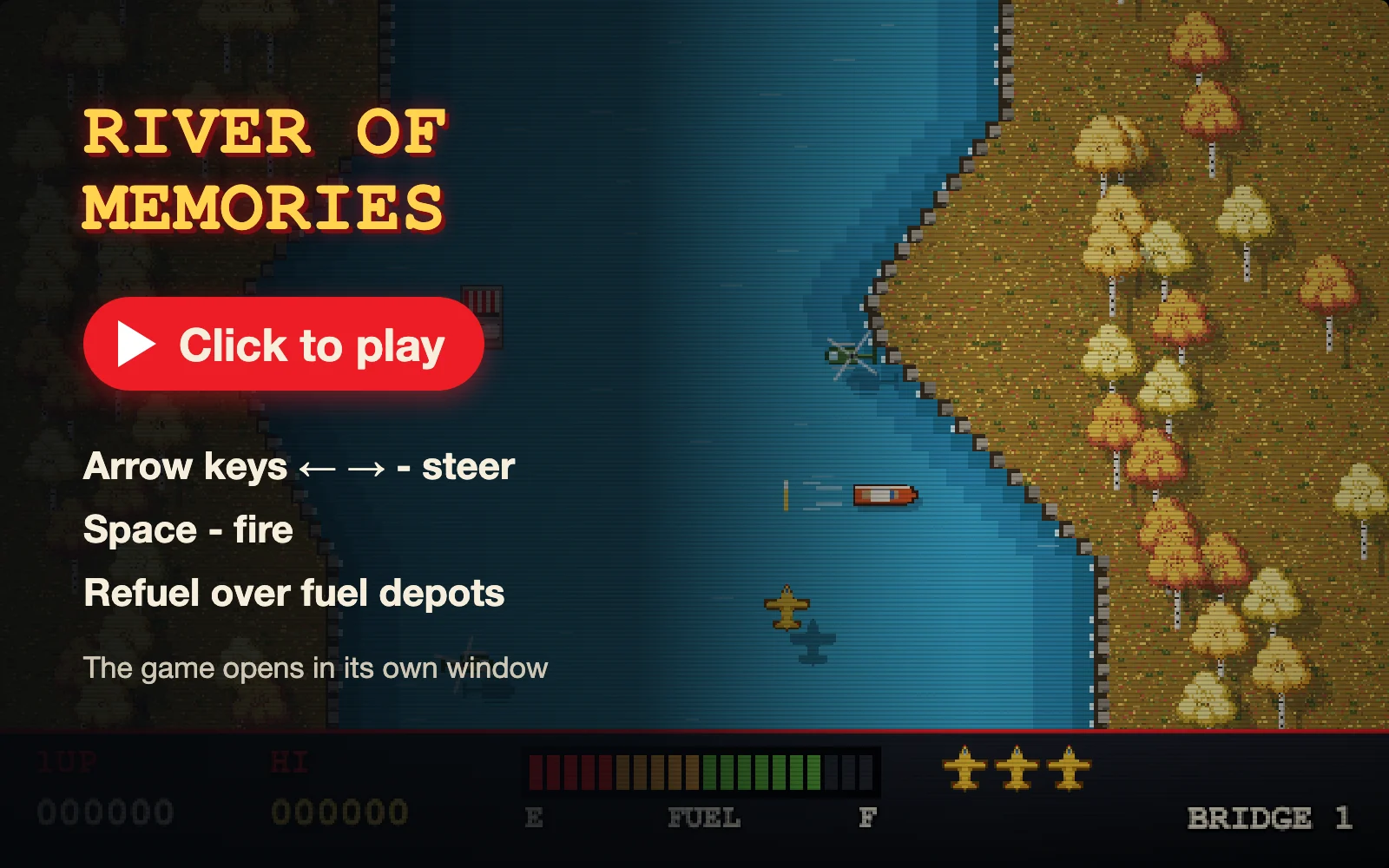
The game opens in its own window and also runs on a phone, best held sideways. The version written with Claude Code is on a separate page.
Three conclusions follow. First, with an MoE model the PGX, with half the MacBook's bandwidth, was faster, and its lead was larger on the long answer. An MoE model reads only around 2 GB of weights per token, so the most likely explanation is compute and software - CUDA on the PGX, Metal on the Mac. A laptop under sustained load may also throttle, and I measured the long answer on an idle PGX only once. That is one model and a handful of runs, not a rule. Second, a shared machine writes as fast as its other workloads allow, which is why I quote a client a specific speed only after measuring the target model under the target load. Third, a local 30B model is good for drafts, supporting code and fixes against a list of defects, and it delivered a finished product only under the supervision of a cloud model that prepared its design, tests and code reviews. That is the role we give it at SNOK, and we keep the specification, code, prompts and measurements in our knowledge repository so that we can repeat the test on new hardware in six months.
## How we use local models at SNOK
We run local models at two levels.
On my MacBook I test models. I try new releases, compare them on the same prompts, as in the test above, and choose the ones worth moving to a server.
Continuous workloads run on two Lenovo ThinkStation PGX units. They support the team with coding, tender analysis and AI agent security testing. For tenders, the model matches the requirements in the documentation against our competences. The documents themselves are public, but our assessment of the odds and the decision to bid are information we would rather not send to an outside provider. In security testing, a local model probes how well agents resist manipulation before we propose them to a client. On the PGX we also built, with synthetic data, a demo of an AI assistant designed to run entirely on the client's infrastructure.
Under our ISO 27001 information security management system, client data covered by an NDA is processed in the client's environment, not on our hardware. If a model needs to work on such data, we run it at the client's site, and that is one of the reasons clients ask us about [on-premise language models](https://snok.ai/en/offer/ai-automation/llm-on-premise/) and [AI assistants built on their own documents](https://snok.ai/en/offer/ai-automation/rag-ai-assistants/).
## Which model for which job: my cheat sheet
| Who | Hardware | Model |
|---|---|---|
| Executive, manager | Mac mini M6, 16 GB | Qwen3.5-9B |
| Analyst, consultant | MacBook Pro M6, 32 GB | Qwen3.6-35B-A3B |
| Developer | Mac mini M5 Pro, 64 GB | qwen3-coder 30B, Qwen3.8-27B |
| Team, department | PGX or Mac Studio M5 Max | gpt-oss-120b |
| Lab, proofs of concept | Mac Studio M5 Ultra or two PGX | Qwen3-235B-A22B |
**Executives and managers.** A 7-9B model is enough for summarising documents, polishing text and drafting notes. Qwen3.5-9B takes about 5.4 GB at 4 bits and runs on the base 16 GB Mac mini. I recommend LM Studio, because installing it and choosing a model needs no terminal.
**Analysts and consultants.** With long documents, what counts is headroom for context. Qwen3.6-35B-A3B takes about 20 GB at 4 bits and writes at small-model speed, so a 32 GB machine leaves room for medium-length documents. For very long material I would choose 64 GB.
**Developers.** I tested qwen3-coder 30B here: it is fast and well suited to drafts, tests and fixes. For harder tasks I would pick the dense Qwen3.8-27B, which is slower but uses the whole network for every token. Either fits in 32 GB on its own, but 64 GB with M5 Pro lets you keep both loaded without fighting the IDE and browser for memory.
**Teams and departments.** When several people use a model at once, I would choose the PGX: vLLM serves many requests in parallel, and whatever you build on it moves to a server. In our lab gpt-oss-120b took about 63 GB and generated 56-60 tokens per second on GB10. For a single demanding user, a Mac Studio or MacBook Pro with M5 Max and 128 GB is the better fit.
**Labs and proofs of concept.** Qwen3-235B-A22B at 3 bits took about 104 GB with us and generated about 15.6 tokens per second on a single GB10. At 4 bits, 235B models call for a Mac Studio with M5 Ultra or two PGX units, and 405B models need 512 GB.
If you already have a Mac with 16 GB, start with Ollama or LM Studio and a 7-9B model on your own documents. A week of that work is a better basis for a purchase than any ranking. If you are buying hardware, start from the model: work out its size at 4 bits, add headroom for context, the operating system and a second model, and only then choose the chip class. If you would like to compare a Mac and a PGX on your own use case before buying anything, [get in touch](https://snok.ai/en/contact/).
## Sources
- Code&future, ["Best Local LLMs for Mac in 2026: The Ultimate M1 to M6 Guide"](https://python.plainenglish.io/best-local-llms-for-mac-in-2026-the-ultimate-m1-to-m6-guide-2ba2ee8a829e), Python in Plain English, 28.10.2026 (accessed 06.11.2026)
- Apple Newsroom, [M5 Pro and M5 Max](https://www.apple.com/newsroom/2026/03/apple-debuts-m5-pro-and-m5-max-to-supercharge-the-most-demanding-pro-workflows/), 03.03.2026 (accessed 06.11.2026)
- Apple Newsroom, [Mac mini with M6 and M5 Pro](https://www.apple.com/newsroom/2026/08/apple-unveils-a-more-powerful-mac-mini-featuring-the-all-new-m6-and-m5-pro/), 25.08.2026 (accessed 06.11.2026)
- Apple Newsroom, [Mac Studio with M5 Max and M5 Ultra](https://www.apple.com/newsroom/2026/08/apple-introduces-new-mac-studio-with-m5-max-and-m5-ultra/), 25.08.2026 (accessed 06.11.2026)
- Apple Newsroom, [14-inch MacBook Pro with M6](https://www.apple.com/newsroom/2026/10/apple-introduces-the-new-14-inch-macbook-pro-with-m6/) and [iMac with M6](https://www.apple.com/newsroom/2026/10/apple-unveils-new-imac-with-m6/), 27.10.2026 (accessed 06.11.2026)
- Apple Store Poland, [Mac Studio configurator](https://www.apple.com/pl/shop/buy-mac/mac-studio) (accessed 07.11.2026)
- NVIDIA, [DGX Spark](https://www.nvidia.com/en-us/products/workstations/dgx-spark/) (accessed 08.09.2026) and [NVIDIA Sync - Cluster Assistant](https://docs.nvidia.com/sync/latest/cluster-assistant.html) (accessed 06.11.2026)
- Hugging Face model cards: [Qwen3.6-35B-A3B](https://huggingface.co/Qwen/Qwen3.6-35B-A3B), [Qwen3.8-27B](https://huggingface.co/Qwen/Qwen3.8-27B), [Qwen3.5-9B](https://huggingface.co/Qwen/Qwen3.5-9B) (accessed 06.11.2026)
- Wikipedia, [River Raid](https://en.wikipedia.org/wiki/River_Raid) (accessed 07.11.2026)
- SNOK measurement: MacBook Pro M4 Max 128 GB and Lenovo ThinkStation PGX, Ollama, qwen3-coder 30B Q4_K_M, 06-07.11.2026